Embedded Computer:
Built Around the Mission.
Not Just the Processor.
An embedded computer is a purpose-focused computing platform integrated into a larger product or operational system. For connected vehicles, the best choice is the platform that keeps applications, vehicle data, power management, and operator workflows working together—not simply the one with the fastest chip.
Definition context: IBM describes an embedded system as a specific combination of hardware and software designed for a purpose or task .
in brief
Choose a mission-fit embedded computer by validating the actual installation: electrical behavior, usable interfaces, environmental exposure, application compatibility, and the support lifecycle. Treat processor specifications and ruggedness labels as inputs to that decision—not substitutes for deployment testing.
The selection framework below is engineering guidance. It is not a certification, a benchmark result, or a claim that every rugged tablet meets every vehicle requirement.
What is an embedded computer?
The defining characteristic is its role inside a larger system. An embedded computer runs software for a defined operational purpose: collecting machine data, presenting a driver interface, coordinating a workflow, or connecting equipment to a network.
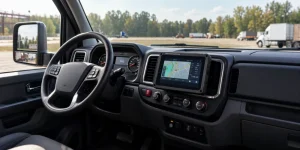
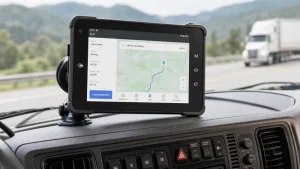
“Embedded” does not mean “no screen,” “tiny,” or “low performance.” A rugged vehicle-mounted tablet can serve as the visible computing interface of an embedded fleet system, while a separate controller handles lower-level machine functions.
Hardware can range from a microcontroller to a more capable application-processor platform. IBM describes a microcontroller as a small computer on a single chip, integrating processing, memory, and input/output peripherals for specific tasks.
Technical background: IBM: What is a microcontroller? .
Embedded computer vs. rugged tablet: a question of role
These categories overlap. “Embedded computer” describes how a platform is used; “rugged tablet” describes its physical format and intended environmental durability. Start with the workflow, then select the enclosure and interface that support it.
| Platform | Consider it when… | Validate before selection |
|---|---|---|
| Embedded board or system-on-module | You are designing the enclosure, carrier electronics, and product integration. | Board support, thermal design, carrier development, and production availability. |
| Industrial box computer | Computing is installed out of sight, with a separate display or no local display. | Mounting space, cooling, power conditioning, and external display connections. |
| Rugged vehicle tablet | The operator needs a touch interface at the point of work. | Display readability, docking, connector retention, vehicle I/O, and ergonomics. |
| Microcontroller-based controller | The job centers on focused sensing, control, or tightly bounded device functions. | Timing requirements, peripherals, memory, firmware, and safety responsibilities. |
This table is an editorial selection framework, not a performance ranking. Microcontroller characteristics are grounded in IBM’s technical overview.
How to choose an embedded computer for vehicle applications
A truck fleet, bus operator, forklift integrator, and agricultural equipment manufacturer can all need rugged embedded computing—but their acceptance criteria should not be identical. Translate the operating environment into testable requirements.
Specify behavior, not just voltage
Request the supported input range, ignition-control behavior, shutdown policy, standby consumption, and power-interruption recovery. Ask separately for evidence of the transient and EMC tests your installation requires; a wide input-voltage range alone does not answer those questions.
A connector is not an integration
For a CAN bus embedded computer, request the pinout, electrical characteristics, driver support, SDK, and required protocol access. Confirm the exact J1939 or OBD-related data path with your software team instead of assuming that a CAN port provides a complete application integration.
Test the screen in the actual cab
Evaluate glare, viewing angle, touch behavior, glove use, mounting position, and night-time dimming. Review cable routing and driver sightlines in the installed vehicle. A display specification cannot replace an installation assessment.
Validate the deployed workload
Run your navigation, dispatch, logging, camera, or warehouse application on the intended OS build. Test offline behavior, storage exhaustion, restart recovery, update rollback, and the sustained workload—not only a short demonstration.
Read rugged embedded computer specifications without the hype
Ingress protection is a specific enclosure claim
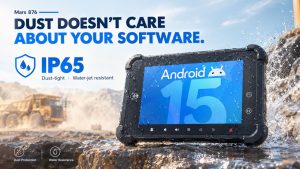
The IEC explains that IP ratings grade enclosure protection against solid objects and liquids. The first digit addresses solids; the second addresses water. An IP rating does not, by itself, establish vibration resistance, electrical immunity, or operating temperature capability.
For procurement, request the applicable test report and clarify whether the rating depends on closed port covers, particular connectors, or a specific installed configuration.
Primary source: IEC: Ingress Protection ratings .
Ask which tests, under which conditions
The U.S. Defense Logistics Agency describes MIL-STD-810 as an environmental tailoring framework. Its scope explicitly states that the document does not impose design or test specifications. Consequently, a bare “MIL-STD-810” label is insufficient evidence of suitability for your vehicle installation.
Request the revision, methods, procedures, severities, durations, operating state, mounting configuration, and acceptance criteria relevant to the model being offered.
Primary source: DLA ASSIST: MIL-STD-810 scope and document record .
“This document does not impose design or test specifications.” — MIL-STD-810 scope, as reproduced in the DLA ASSIST document record.
Android, Linux, or an RTOS? Start with the workload
For an Android embedded computer, verify application compatibility, peripheral access, device-management support, and the OS update policy. For a Linux embedded computer, evaluate the board-support package, kernel and driver maintenance, application packaging, and recovery tools. Neither OS name alone establishes long-term support.
A real-time operating system addresses a different requirement: predictable responses within timing constraints. IBM defines an RTOS around time-sensitive tasks with precise timing requirements. Do not confuse a responsive tablet interface with proven deterministic control behavior.
Where a project includes both operator interaction and timing-critical control, define the boundary explicitly: what runs on the terminal, what remains on a dedicated controller, and how the two exchange data. Safety-related functions require their own engineering assessment; ordinary ruggedness claims do not establish functional safety.
Technical background: IBM: What is a real-time operating system? .
Security belongs in the hardware shortlist
NISTIR 8259A provides a core baseline of IoT device cybersecurity capabilities and describes it as a starting point for manufacturers, integrators, and buyers—not a universal product certification. Use it to turn security discussions into specific supplier questions.
Ask for technical evidence
- How is each deployed device uniquely identified?
- Who can change the configuration or access interfaces?
- How are stored and transmitted data protected?
- How are software updates authorized and installed?
- What security-state information can administrators retrieve?
Ask for a support commitment
Obtain the security-update policy, support end date, vulnerability reporting route, recovery procedure, and responsibilities shared between the hardware supplier and your application team.
These are procurement questions, not claims that a particular platform already implements every capability. Record the answers in the deployment requirements and verify the relevant functions.
Primary source: NISTIR 8259A: IoT Device Cybersecurity Capability Core Baseline .
A vehicle-facing example: WAYSION Q777
Where the embedded computer becomes the operator interface
WAYSION’s Q777 product documentation lists a 7-inch Android 14 platform with a Rockchip RK3568 processor, IP65 protection, CAN connectivity, 4G LTE, and a docking design. These features make it a candidate for evaluation in fleet, logistics, and other vehicle-mounted application projects. [waysion](https://www.waysion.com/q777-rugged-android-tablet/)
Validate the offered configuration against your project: connector pinouts, supported protocols, required SDKs, mounting accessories, OS build, and applicable test reports. Product descriptions are supplier claims, not independent verification of your complete installation.
Review Q777 vehicle tablet specificationsProduct evidence: WAYSION’s Q777 product page. Specifications and available options should be confirmed for the quoted configuration. No independent performance benchmark is asserted here.
For a broader form-factor comparison, explore the WAYSION rugged tablet range for vehicle and industrial integration and apply the same electrical, mechanical, software, and lifecycle acceptance criteria to each candidate.
Embedded computer questions, answered directly
Can a rugged tablet be an embedded computer?
Yes. When integrated into a larger operational system for a defined purpose, a rugged tablet can function as its embedded computing terminal and human-machine interface. Its tablet form factor does not prevent that role. The underlying concept is a purposeful hardware-and-software system.
Is a microcontroller the same as an embedded computer?
A microcontroller is one possible hardware foundation for embedded computing, not the only one. It integrates processing, memory, and peripherals on a chip; more capable embedded platforms may instead use application processors and operating systems.
Does an IP rating prove a computer is suitable for a vehicle?
No. An IP rating addresses enclosure protection against solids and water. Vehicle suitability also needs a separate assessment of power, mounting, environmental tests, interfaces, and software behavior in the intended installation. [iec](https://www.iec.ch/ip-ratings)
Does MIL-STD-810 mean every model passed the same tests?
No. The standard emphasizes environmental tailoring rather than imposing one universal set of design or test specifications. Request the actual test methods and conditions for the offered model.
What should an embedded computer supplier provide before a pilot?
Request a configuration-specific specification, interface documentation, software support details, applicable test evidence, update policy, accessory list, and lifecycle commitments. Then agree on an acceptance plan using your vehicle, software, and operational workload.
Buy against an operating requirement—not a headline specification.
A useful supplier discussion begins with the vehicle, the application, the installation, and the expected service life. Bring those requirements together in one acceptance plan so the selected embedded computer is evaluated as part of the system it must actually support.
Editorial transparency: selection recommendations are engineering guidance, not reported laboratory findings. Standards interpretations and technical definitions are attributed inline. WAYSION product details are identified as manufacturer-supplied information. Illustrations are original conceptual diagrams, not product photographs.
Tags: Android embedded computer for vehicles, embedded computer for vehicle applications, industrial embedded computer with CAN bus, rugged embedded computer for fleet management, rugged vehicle mounted tablet computer