Rugged Industrial Computer for Mining: Engineer the Whole Shift, Not Just the Screen
The right rugged industrial computer for mining is the one that keeps the operator’s workflow usable when dust, vibration, unstable vehicle power, and network outages arrive together. Start with the mine’s hazardous-area requirements, then validate the complete installation: computer, mount, power conditioning, interfaces, software, and offline behavior. Treat ruggedness as a system requirement—not a single enclosure rating.
What should a mining vehicle computer actually do?
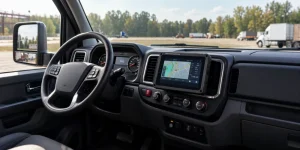
A rugged industrial computer is a hardened computing platform for demanding operating environments. In a mining vehicle, a rugged tablet typically serves as the human–machine interface: the screen through which an operator receives assignments, reviews machine information, completes inspections, and communicates with dispatch.
That role differs from a headless industrial edge computer that processes sensor streams without a local display. It also differs from a machine controller that directly governs equipment motion. Choose a vehicle-mounted rugged tablet when the primary requirement is a dependable operator interface; evaluate a separate edge computer when processing, storage, or expansion requirements exceed the terminal’s practical limits.
Keep safety functions separate unless the complete architecture has been engineered and approved for them. NIOSH’s proximity-detection research describes systems that track workers relative to machinery and inhibit hazardous movements. Displaying an alert on a tablet is not equivalent to delivering that protective function.
Research basis: NIOSH, “Mining Topic: Proximity Detection.” Read the NIOSH overview.Open-pit and underground mining need different specifications
Avoid purchasing one “mining tablet” specification for every vehicle and location. Build the requirements around the actual installation: an enclosed haul-truck cab, an exposed service vehicle, and an underground machine can face very different environmental and regulatory conditions.
| Deployment | Requirements to investigate | Evidence to request |
|---|---|---|
| Open-pit haul truck or loader | Display readability, cab heat, vibration, antenna placement, vehicle power, intermittent connectivity | Installed readability trial, mounting assessment, thermal results, and power-event logs |
| Underground vehicle in a permitted non-hazardous location | Local communications coverage, positioning infrastructure, offline operation, connector sealing, maintainability | Route-level coverage survey, disconnected workflow test, and site authorization for the installation |
| Classified explosive atmosphere | Applicable equipment approval, protection concept, temperature limits, installation conditions, and accessory compatibility | Valid certificates or approvals matching the exact configuration and local mining requirements |
| Mobile maintenance and inspection | Glove operation, docking cycles, task duration away from vehicle power, documentation capture | Representative inspection trial using the intended PPE, applications, and accessories |
Design an offline-capable mining fleet terminal
Use the following reference architecture to separate machine data, operator workflows, communications, and business systems. It is a planning model—not a claim that every tablet includes every interface or software function.
OEM-approved machine data, cameras, ignition state, and supported external sensors.
Operator interface, local task data, timestamps, event queue, and visible connection status.
Validated cellular or Wi-Fi connectivity, with application-level retry and reconciliation.
Dispatch, maintenance, reporting, identity management, and controlled software updates.
Connectivity is a workflow requirement
During procurement, specify what the operator must still do without a server connection. Examples include viewing the last acknowledged assignment, completing an inspection, recording a defect, and distinguishing a saved local event from a successfully synchronized event.
Positioning is not the same as connectivity
A connected underground mining tablet does not automatically have a usable GPS position. GPS.gov identifies indoor or underground use, signal blockage, and multipath as causes of degraded accuracy. Where satellite positioning is unavailable, evaluate a site-specific positioning system and test its coverage and accuracy against the actual workflow.
Positioning limitation: GPS.gov, “GPS Accuracy.” Review GPS accuracy limitations.The rugged mining computer specification that matters in the cab
The following is a proposed procurement checklist. Use it to turn broad product claims into acceptance criteria for your fleet, rather than treating it as a universal mining standard.
| Buying criterion | Question to ask | What to validate |
|---|---|---|
| Dust and water protection | Which enclosure configuration was tested? | Port caps, connected cables, dock, cleaning restrictions, and the supplied test report |
| Shock and vibration | Which methods, profiles, durations, and pass criteria were used? | The device, bracket, fasteners, connector retention, and cable routing as an installed assembly |
| Sunlight-readable display | Can the actual application be read from the operator’s position? | Glare, viewing angle, text size, gloves, nighttime dimming, and any protective overlay |
| Vehicle power input | What happens during cranking, ignition changes, and supply interruption? | Startup, shutdown, data preservation, standby draw, and required external protection |
| CAN bus and J1939 integration | Are the required messages, permissions, and software interfaces supported? | OEM-approved access, SDK documentation, sample code, and a vehicle-specific integration test |
| Operating temperature | Does the stated range cover the selected configuration and workload? | Hot-soak startup, sustained application load, screen brightness, and charging restrictions if applicable |
| Software lifecycle | What support is contractually committed? | Security patch policy, OS support dates, update rollback, MDM compatibility, and spare-unit provisioning |
Be precise about MIL-STD-810 claims. The U.S. Defense Logistics Agency describes MIL-STD-810 as an environmental-tailoring framework and states that it “does not impose design or test specifications.” Ask for the relevant test methods and results instead of accepting “military grade” as a complete specification.
Primary standard record: DLA ASSIST, MIL-STD-810. Read the official standard scope.A connector list tells you what can be attached. An integration test tells you whether the mining workflow actually works.
Two WAYSION platforms to evaluate for mining vehicle installations
These vehicle-mounted Android tablets are potential starting points for operator terminals and telemetry interfaces. The specifications below are manufacturer-published; suitability depends on the selected configuration, application integration, installation testing, and site authorization.
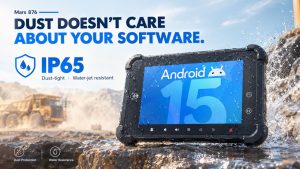
Mars 876
Consider this platform when the operator interface needs more display area than a 7-inch terminal and the project calls for vehicle I/O or camera integration.
- Android 15 and RK3576 processor.
- 8-inch, 1200 × 1920 display; published brightness of 700 nits, with a 1000-nit option.
- IP65 enclosure and published operating range of −20°C to +70°C.
- Published 9–36 V DC input, CAN, RS232, Ethernet, GPIO, and AHD camera interfaces; RS485 is listed as optional.
- Published NPU capability of 6 TOPS at INT8; actual AI performance depends on the model, software, and thermal workload.
Ask for the exact interface configuration, harness, SDK, display option, and sustained-load test results. Published specifications are not a guarantee of application-level performance.
Review Mars 876 specifications →Q777
Consider this platform for space-constrained cabs where dispatch, inspection, and machine-data screens can be designed around a compact operator interface.
- 7-inch vehicle-mounted tablet with Android 14.
- Rockchip RK3568 platform.
- Published IP65 enclosure rating.
- Published 4G LTE, Wi-Fi, Bluetooth, and GNSS connectivity.
- CAN and serial interface options, AHD camera input, docking design, and published 9–36 V vehicle power support.
Validate J1939 integration for the specific machine and application. Confirm the supplied dock, harness, interface options, and environmental test evidence before ordering.
Review Q777 specifications →Android, edge AI, and fleet software: buy the support model too
Evaluate the operating system against the application you will actually deploy. For an Android mining fleet management tablet, test the dispatch client, kiosk mode, MDM enrollment, peripheral drivers, authentication, and offline behavior on the intended firmware—not just on a developer’s desktop.
Request a written lifecycle statement. A newer OS version alone does not establish how long a supplier will deliver security updates, maintain an SDK, or keep a replacement unit compatible with your application.
Treat edge AI specifications with the same discipline. If the project includes camera analytics or operator-assistance functions, benchmark the real model with the intended video streams, lighting, temperature, and latency requirement. A processor’s TOPS figure is not an end-to-end safety or performance guarantee.
A practical acceptance plan for rugged computers in mining
Define pass/fail criteria before the trial starts. Include representative vehicles, operators, routes, shifts, and environmental conditions. A successful bench demonstration should begin the evaluation—not end it.
-
Approve the installation boundaries
Record the permitted operating locations, hazardous-area restrictions, operator sightlines, emergency egress, mounting positions, and responsibilities for machine-data access.
-
Exercise the power and mounting system
Test representative start/stop cycles, supply interruptions, cable strain relief, connector retention, and the installed mount. Log unexpected resets and inspect the assembly after operation.
-
Disconnect the network deliberately
Complete the intended workflow without coverage. Reconnect and check event order, timestamps, duplicate handling, acknowledgments, and the operator’s ability to identify stale information.
-
Run a representative loaded shift
Use the actual app, brightness setting, vehicle interfaces, and camera configuration. Record thermal behavior, app stability, readability, touch usability, and operator feedback.
-
Replace and recover a failed terminal
Time the physical replacement, device enrollment, application restoration, configuration recovery, and return to productive work. Confirm how unsynchronized data will be handled.
Compare cost per supported workflow—not tablet price alone
A useful total-cost comparison includes the installed system and its support burden. Use your own pilot results to estimate replacement effort, troubleshooting time, software maintenance, and any workflow disruption attributable to the computing system. Do not assume a published durability claim translates directly into a particular financial return.
- Use the same evaluation period and fleet size for every candidate.
- Separate one-time engineering costs from recurring per-device costs.
- Track workflow interruption separately from full vehicle downtime; they are not always the same event.
- Include a sensitivity range for failure rates and recovery time instead of presenting an uncertain forecast as a guaranteed saving.
Rugged industrial computer for mining: FAQ
Is an IP65 rugged tablet suitable for underground mining?
Not on the IP rating alone. Underground suitability depends on the location’s classification, applicable mining approvals, installation conditions, communications, and operational requirements. IP addresses ingress protection; explosion-protection assessment is separate.
Will GPS work on an underground mining tablet?
Do not depend on ordinary satellite GPS for an underground positioning requirement. GPS.gov identifies underground use and signal blockage as causes of degraded accuracy. Establish the required positioning performance and validate an appropriate site-specific solution.
Does a CAN port guarantee J1939 compatibility?
No. Treat the CAN interface as the starting point for integration. Require evidence that the software supports the needed J1939 messages and that access is permitted for the target machine. Validate the complete hardware, SDK, application, and vehicle combination before rollout.
Should a mining fleet choose a 7-inch or 8-inch vehicle tablet?
Choose through an installed usability trial. A compact terminal may fit a restricted cab more easily; a larger display may improve the layout of maps, inspections, or camera views. The deciding factors are readable content, operator reach, mounting space, sightlines, and safe interaction—not diagonal size alone.
Can a rugged tablet replace a proximity-detection safety system?
Not simply by displaying warnings. NIOSH describes proximity-detection approaches that determine worker location and inhibit hazardous machine motion. Any proposed replacement must be assessed as a complete protective system, rather than as a screen or application feature.
Tags: industrial computer for underground mining, rugged Android tablet with CAN bus, rugged industrial computer for mining, rugged tablet for mining vehicles, vehicle mounted tablet for mining fleet management