- The Android Ecosystem: Speed, Familiarity, and App Ecosystem
- The Debian Linux Alternative: Stability, Security, and Customization
- Head-to-Head Comparison: Android vs. Debian Linux Tablets
- Real-World Scenarios: Matching Device to Task
- The Hidden Costs of Operating System Choice
- Security Considerations in Industrial Environments
- Final Recommendation for Procurement Teams
- FAQ
Selecting the correct operating system for a 10-inch industrial device is not just a technical preference; it is a critical operational decision that dictates your workflow efficiency, security posture, and long-term return on investment. For manufacturing supervisors, warehouse managers, and IT administrators in the industrial sector, the choice between a rugged Android tablet and a Debian-based Linux tablet often feels binary, yet the reality is nuanced. You are likely searching for this keyword because you face specific pain points: Android offers immediate app compatibility and user familiarity, while Linux provides superior stability, security, and customizability for specialized tasks. This guide breaks down the hardware and software realities of both ecosystems to help you determine which platform aligns with your specific operational requirements, ensuring you avoid costly misalignment between software and hardware.
The Android Ecosystem: Speed, Familiarity, and App Ecosystem
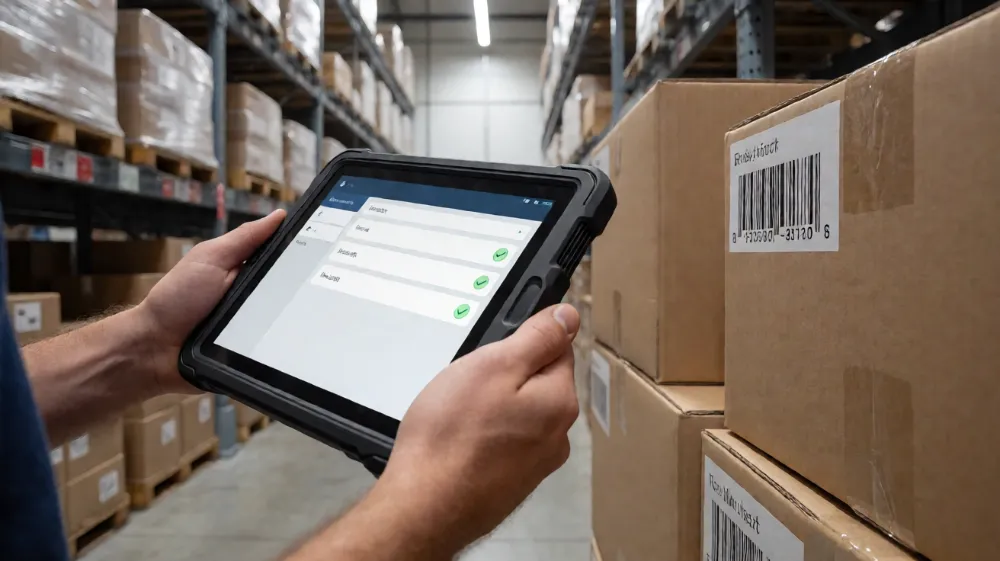
Android remains the dominant mobile OS in industrial environments, largely due to its ubiquity. When evaluating a 10-inch rugged Android tablet, your primary advantage is the immediate availability of Commercial Off-The-Shelf (COTS) applications. If your warehouse team already uses consumer-grade barcode scanning apps or field service software developed specifically for Android, migration to a rugged device is seamless. The user learning curve is negligible, as workers familiar with smartphones can operate these tablets with minimal training.
However, “rugged” Android devices are not just consumer tablets reinforced with plastic cases. They are industrial-grade units engineered for specific stress factors. When sourcing these devices, you must look beyond the IP rating and verify the processor generation and thermal management capabilities. High-end 10-inch rugged Android tablets typically utilize mid-range to high-end processors to handle intensive GIS mapping, real-time video analytics, or heavy logistics software.
Key Hardware Specifications for Industrial 10-Inch Android Tablets:
- Processor: Look for Qualcomm Snapdragon 660, 778G, or MediaTek Dimensity series for balance between power and battery life. For heavy compute, Intel Celeron N5095 or AMD Ryzen 5 mobile chips are emerging in 2-in-1 industrial designs.
- Memory (RAM/Storage): Minimum 4GB RAM / 64GB eMMC. High-performance variants offer 8GB LPDDR4X RAM and 128GB UFS storage for faster data retrieval and app launching.
- Battery: Industrial standards demand replaceable or hot-swappable batteries. Look for 8,000mAh to 12,000mAh capacity with dual-charging support (fast charging via USB-C and simultaneous operation).
- Ingress Protection: IP68 is the baseline for wet/dusty environments. IP69K is required for high-pressure washing and steam cleaning, common in food processing and pharmaceutical manufacturing.
- Dropped Height: MIL-STD-810G certified devices should withstand drops from 1.8 meters (6 feet) onto concrete.
- Connectivity: 5G NR and Wi-Fi 6 support are becoming standard for high-throughput data offloading in smart factories. LTE Cat-13 or Cat-19 is typical for connectivity.
- Operating System: Android 11 or Android 13 are the current standards. Verify the manufacturer’s commitment to security patching; a minimum of 3-5 years of security updates is essential for IoT security compliance.
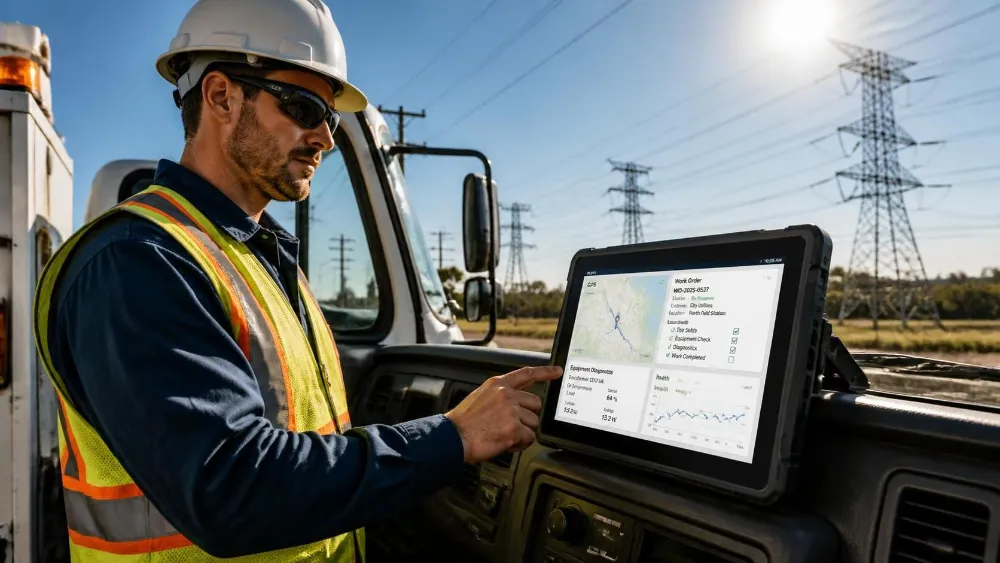
Where Android Excels: Android is the superior choice for asset tracking, inventory management, and field service operations. The ecosystem supports one-time authentication (MFA), which is critical for secure logins in secure facilities. The “kiosk mode” functionality allows IT departments to lock down devices to specific applications, preventing user tampering. If your workforce is diverse in skill level or if you rely on third-party SaaS platforms that only offer Android APKs, there is no viable alternative.
The Debian Linux Alternative: Stability, Security, and Customization
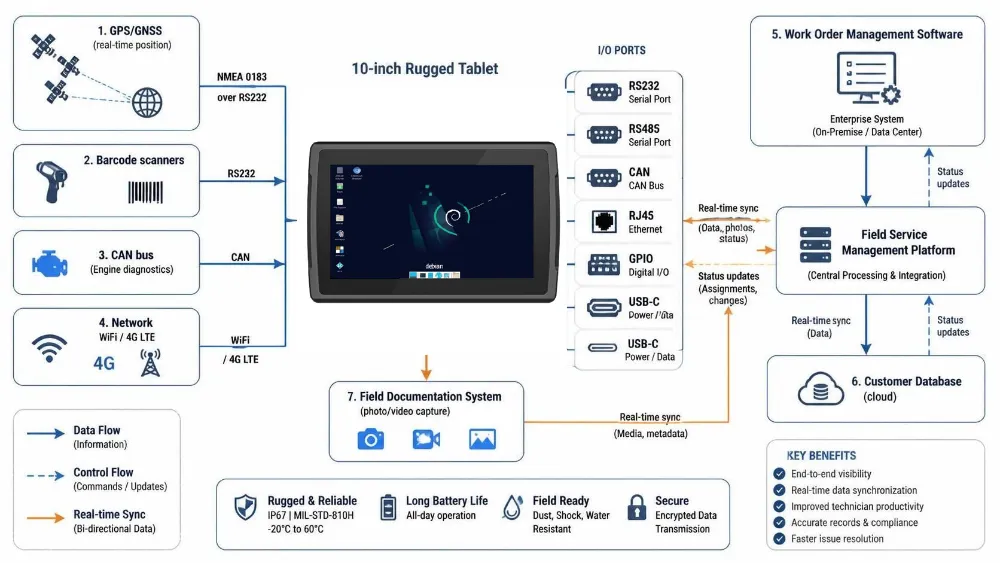
Choosing a Debian-based 10-inch Linux tablet shifts the paradigm entirely. These devices are not consumer gadgets; they are industrial Single Board Computers (SBCs) or rugged panels designed for control systems, machine vision, and data logging. Debian Linux is preferred for its stability, open-source nature, and ability to run indefinitely without reboots. For machine shops and automated assembly lines, a Linux-based tablet serves as a HMI (Human-Machine Interface) or a local data server.
The primary advantage of Debian over Android in this form factor is the file system permissions and service management. You can run Docker containers, host local databases, and execute custom C++ or Python scripts that communicate directly with PLCs and sensors via Industrial Ethernet. While Android allows for similar things via AIDL (Android Inter-Process Communication), the overhead and security sandboxing can complicate real-time data processing.
Key Hardware Specifications for Industrial 10-Inch Debian Linux Tablets:
- Processor: Intel Core i5/i7 mobile processors or AMD Ryzen 5/7 are common in larger 10-inch industrial panels. For battery-powered handheld units, ARM-based processors like NXP i.MX8 or Rockchip RK3588 are standard.
- Memory (RAM/Storage): Minimum 8GB DDR4 RAM. Storage often includes M.2 NVMe SSD slots for high I/O performance, essential for video analytics or large log files.
- Battery: Often optional in fixed install panels. For mobile units, expect 6,000mAh to 9,000mAh with long-life Li-ion chemistries.
- Ingress Protection: Similar to Android, IP65 to IP69K ratings apply.
- Connectivity: Gigabit Ethernet ports are frequently included on Linux panels for direct PLC integration, which is rare on Android handhelds. Wi-Fi 6 and Bluetooth 5.2 are standard.
- Operating System: Debian 11 (Bullseye) or Debian 12 (Bookworm). Long-term support (LTS) kernels are critical for industrial stability.
Where Linux Excels: Linux is the definitive choice for OEE (Overall Equipment Effectiveness) monitoring, SCADA client terminals, and machine vision inspection stations. The ability to strip the OS down to a minimal kernel size reduces attack surface. Furthermore, Debian’s package management system (APT) allows for precise dependency control, preventing the “DLL hell” common in Windows-based industrial PCs and the fragmentation issues in Android. If your team consists of engineers who can script in Bash or Python, the flexibility of a Debian tablet outweighs the convenience of Android.
Head-to-Head Comparison: Android vs. Debian Linux Tablets
To visualize the differences, the following table compares the core attributes of a 10-inch rugged device running Android versus a 10-inch rugged device running Debian Linux. This comparison helps clarify which operational model fits your facility.
| Feature | 10-Inch Rugged Android Tablet | 10-Inch Rugged Debian Linux Tablet |
|---|---|---|
| Primary Use Case | Asset tracking, field service, inventory | Machine vision, SCADA, data logging, control |
| User Skill Requirement | Low (Consumer-grade familiarity) | High (CLI proficiency, scripting required) |
| App Ecosystem | Massive (Play Store + Enterprise Apps) | Limited (Custom scripts, Docker, X11 apps) |
| Security Model | Sandboxed, MDM managed | Root-based, firewall strict, minimal attack surface |
| Uptime Expectation | 2-4 weeks (reboot recommended) | 6-12 months (continuous operation) |
| Hardware Cost | Mid to High ($300 – $800) | Low to Mid ($150 – $500) |
| Integration Cost | Low (Plug-and-play) | High (Custom driver/config effort) |
| Real-Time Capabilities | Pseudo-real-time | Hard real-time (with PREEMPT RT patch) |
| Connectivity | 5G/LTE, Wi-Fi 6 | Ethernet, Wi-Fi 6, 5G (optional) |
| Maintenance | Over-the-air (OTA) updates | Manual update via APT, full control |
The data above reveals a clear trade-off. Android minimizes integration effort but maximizes operational security through abstraction. Linux maximizes control and stability but requires dedicated engineering resources. If you lack an internal DevOps team capable of maintaining Linux containers, the total cost of ownership for a Debian tablet will likely exceed that of an Android solution, despite the lower hardware price.
Real-World Scenarios: Matching Device to Task
Understanding the application context is vital. Here are three distinct industrial scenarios to guide your decision-making.
Scenario 1: Warehouse Picking and Verification
- Task: Workers scan barcodes on 10-inch screens, confirm picks, and navigate via indoor GIS.
- Recommendation: Rugged Android Tablet.
- Reasoning: The app ecosystem for WMS (Warehouse Management Systems) is heavily weighted toward Android. The interface is touch-optimized, which reduces errors during high-speed picking. Debian Linux lacks a robust, polished UI framework for such consumer-like interactions, and building a custom UI would be a waste of resources.
Scenario 2: CNC Machine Monitoring and Diagnostics
- Task: A tablet is mounted near a CNC machine, logging error codes, monitoring spindle vibration, and allowing operators to input G-code overrides.
- Recommendation: Rugged Debian Linux Tablet.
- Reasoning: The device needs to run a local database (SQLite or PostgreSQL) and process serial data streams from the machine controller. Linux provides direct access to hardware serial ports and stable, long-running daemons. Android’s power management would likely throttle the CPU or put the radio into sleep mode, disrupting data continuity.
Scenario 3: Food Processing Line Hygiene Check
- Task: Inspectors use a tablet to record sanitation scores, take high-resolution photos of equipment, and upload reports instantly.
- Recommendation: Rugged Android Tablet (IP69K rated).
- Reasoning: The workflow is intermittent and human-centric. The ability to use a dedicated photo app and a secure upload app is critical. While Linux can do this, the usability for a sanitation inspector who is not an IT professional is significantly better on Android. The IP69K rating is crucial for both, but the rugged Android form factor is more readily available in this specific high-ingress protection class.
The Hidden Costs of Operating System Choice
Many procurement teams overlook the lifecycle costs associated with the OS. For Android, the primary cost driver is app development and MDM (Mobile Device Management) licensing. If you build a custom Android app for your specific process, you must maintain it as Android versions update. Google’s promise of 2-3 years of major updates and 5 years of security patches for the AOSP (Android Open Source Project) base means your device will eventually be EOL (End of Life) from a security standpoint. You must budget for hardware refresh every 3-4 years.
For Debian Linux, the hardware refresh cycle is longer. Because Debian LTS kernels are supported for 5+ years, and the hardware is often commodity-based, you can keep the same 10-inch panel running for 7-8 years with minor software updates. However, the labor cost is higher. You need staff who understand systemd, iptables, and udev rules. If you outsource this to a consultant, the hourly rates are significantly higher than for Android app maintenance. Therefore, the “cheaper” Linux tablet might end up more expensive if your in-house engineering capability is limited.
Security Considerations in Industrial Environments
Security is no longer just an IT issue; it is an operational risk. In a manufacturing plant, a compromised tablet can halt production or leak proprietary process parameters.
Android Security: Android’s threat model is built around the consumer. This means it assumes users will download apps from the Play Store. In an industrial setting, you must use enterprise MDM solutions like SOTI, VMware Workspace ONE, or Zebra Zebra Technologies’ EMDM. These tools allow you to restrict the device to a single app (Kiosk Mode), disable USB debugging, and enforce remote wipe policies. The risk is that if an app has a vulnerability, the blast radius can be mitigated by the sandbox, but the OS itself is complex and has a larger attack surface.
Debian Linux Security: Linux security is principle-based. The default Debian install runs with minimal services. You can disable user creation entirely and run as root with a firewall configured to allow only specific IP ranges. This “zero-trust” approach is highly effective for isolated industrial networks. However, if you expose the tablet to the wider internet for cloud sync, you must manage patches yourself. There is no automatic “Play Store update.” You must schedule APT updates during maintenance windows. A misconfigured update can break the device, causing downtime.
Final Recommendation for Procurement Teams
Do not buy a tablet based on the screen size or the IP rating alone. The operating system dictates the utility of the hardware.
- If your goal is mobility and user adoption: Choose a 10-inch Rugged Android Tablet. Prioritize MIL-STD-810G drop specs, IP67/68 ingress protection, and a robust MDM partnership. Ensure your apps are available or easy to develop for Android.
- If your goal is embedded processing and stability: Choose a 10-inch Rugged Debian Linux Tablet. Look for Gigabit Ethernet ports, solid-state drives for reliability, and a vendor who supports Debian 11/12 out of the box. Be prepared to invest in developer resources to manage the stack.
In many modern factories, a hybrid approach emerges. You might use Android tablets for the shop floor workers and Linux panels for the engineering teams and servers. This ensures that each user gets the interface they need while the underlying infrastructure remains secure and stable.
FAQ
Can I run a Debian Linux tablet as a kiosk for machine data logging without an external server?
Yes, Debian is ideal for this. You can install a lightweight database like SQLite or InfluxDB directly on the tablet’s storage. The device can run a Python or C++ script to capture data from local sensors or serial ports, store it locally, and only sync to a central server when a Wi-Fi connection is available. This offline-first architecture is a major advantage over Android for remote or low-connectivity environments.
What is the battery life difference between 10-inch Android and Linux tablets?
In terms of raw hardware drain, there is minimal difference, as the power consumption is driven by the SoC (System on Chip) and screen size. However, Android includes background services for Google Play Services, sync engines, and app widgets that drain battery even when the device is idle. A Debian tablet running in a minimal configuration with a black screen and low-level processes can often last 20-30% longer than an Android tablet running a complex UI. For warehouse shift work, a 10-inch Android tablet with a 10,000mAh battery typically provides 10-12 hours of active use, while a Linux unit might achieve 14-16 hours if configured for low power.
Do I need a specific SIM card type for 5G capable 10-inch rugged tablets?
Most industrial 5G tablets support eUICC (embedded Universal Integrated Circuit Card) technology. This allows you to provision cellular plans remotely via your MDM or IT systems without physically swapping SIM cards. This is critical for global manufacturing footprints where you need to activate devices in different countries without shipping physical cards. Ensure your chosen Android or Linux hardware provider supports eUICC profiles from your specific cellular provider.
To move forward with your specific deployment, contact our industrial solutions team for a free consultation. We can analyze your workflow requirements and recommend the exact 10-inch rugged model, whether Android or Linux, that will deliver the highest ROI for your facility. Request a quote today to see which platform best secures your operational data and productivity.
Tags: 10-inch rugged Android tablet, Android tablet for outdoor use, Android tablets for construction, Best Rugged Tablet, durable Android tablet, heavy-duty tablet, rugged Android tablet, rugged tablet features, Rugged tablet reviews, waterproof Android tablet