
- 1. What is Android MDM? Definition & Enterprise Context
- 2. Why Android MDM is Critical for Modern Enterprises
- 3. Essential Android MDM Features & Capabilities
- 4. Android MDM Use Cases: Industry-Specific Solutions
- 5. How to Choose the Right Android MDM Solution
- 6. Android MDM Implementation: Step-by-Step Guide
- 7. Android MDM Security & Compliance Framework
- 8. Android MDM ROI: Calculating Total Cost of Ownership
- 9. Migrating to a New Android MDM Solution
- 10. Common Android MDM Issues & Solutions
- Conclusion & Getting Started with Android MDM
Android Mobile Device Management (MDM) has become indispensable for enterprises managing distributed workforces across North America, Europe, and Asia-Pacific. This comprehensive guide covers enterprise-grade Android MDM solutions that enable IT administrators to enforce security policies, ensure regulatory compliance (HIPAA, GDPR, SOC2), and optimize device management across thousands of endpoints. Whether you’re managing company-owned devices, BYOD programs, or field worker fleets, this article explores proven MDM strategies, implementation best practices, and real-world ROI metrics. Learn how enterprises reduce security incidents by 60-80%, accelerate device deployment by 50-70%, and maintain compliance while supporting remote and hybrid workforces.
1. What is Android MDM? Definition & Enterprise Context
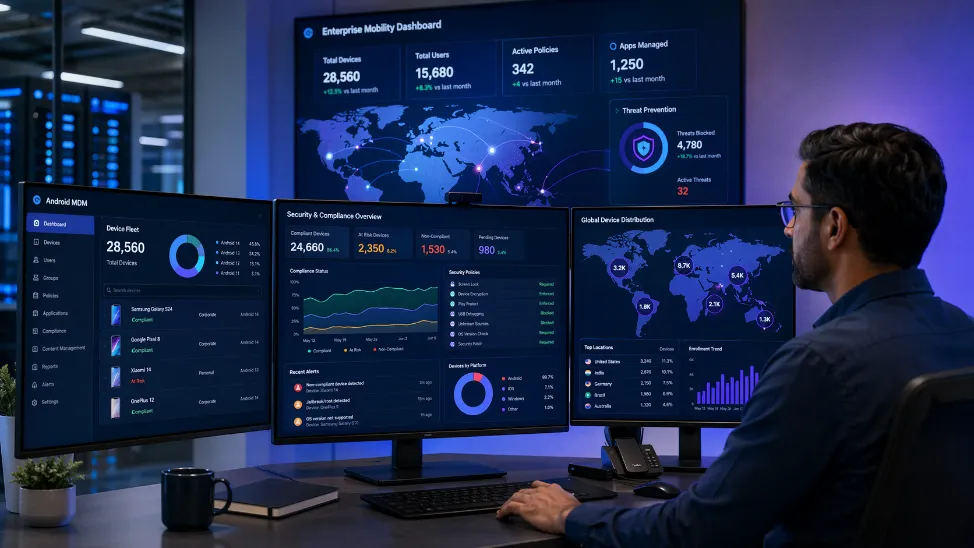
Android Mobile Device Management (MDM) represents a critical infrastructure component for modern enterprises managing mobile device fleets. Unlike consumer device management, enterprise Android MDM provides IT administrators with centralized control, security enforcement, and compliance monitoring across Android smartphones, tablets, and specialized devices.
At its core, Android MDM operates through the Android Enterprise framework, Google’s official mobile device management platform that separates personal and corporate data on managed devices. This architecture enables IT teams to enforce security policies without compromising employee privacy—a critical distinction for BYOD (Bring Your Own Device) programs compliant with GDPR and regional privacy regulations.
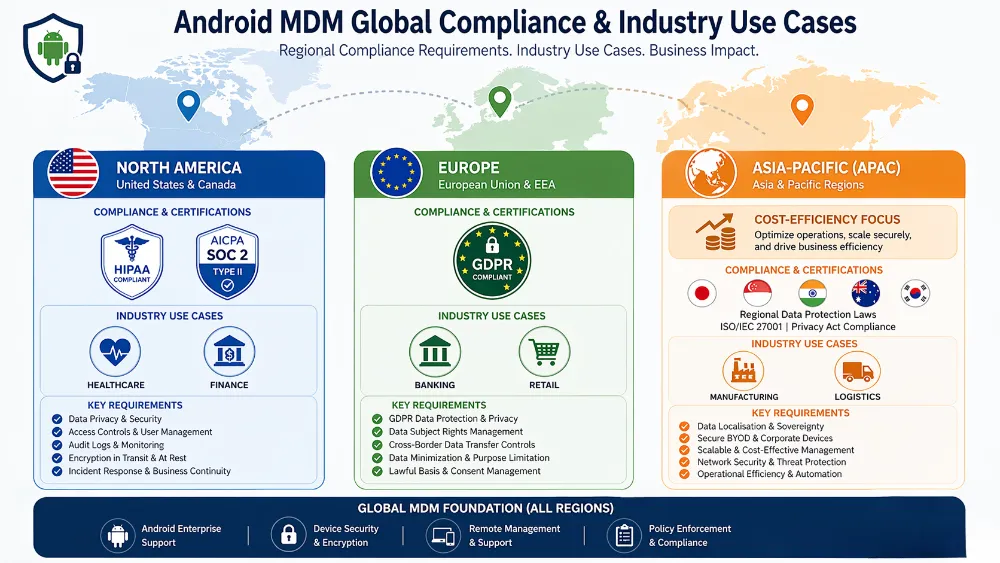
In the US, enterprises prioritize HIPAA and SOC2 compliance; EU organizations focus on GDPR data residency; APAC companies emphasize cost-efficiency and local language support. MDM solutions must adapt to these regional requirements.
android enterprise management platform mobile device management BYOD The distinction between MDM, EMM (Enterprise Mobility Management), and UEM (Unified Endpoint Management) matters significantly for procurement decisions. MDM focuses exclusively on mobile devices, EMM adds app and identity management, while UEM extends to all endpoints including desktops and IoT devices. For organizations managing primarily Android and iOS fleets, MDM provides focused, cost-effective control. Enterprise customers requiring cross-platform management (Windows, macOS, Linux) typically graduate to UEM solutions.
2. Why Android MDM is Critical for Modern Enterprises
The Hidden Costs of Unmanaged Android Devices
Organizations operating without comprehensive Android MDM face substantial financial and security risks. Industry data reveals that unmanaged mobile devices contribute to 40-50% of enterprise data breaches, with average breach costs exceeding $3.9 million according to IBM’s 2024 Cost of a Data Breach Report.
Critical Statistics:
- 60% of enterprises experienced mobile security incidents in 2024
- Unmanaged BYOD devices are 3x more likely to be compromised
- Average compliance violation penalties: $100,000-$1,000,000+ per incident
- Organizations without MDM spend 40% more on incident response
android security management enterprise BYOD security risks Regulatory frameworks across regions mandate specific device management controls. HIPAA-regulated healthcare organizations must enforce encryption, audit logging, and remote wipe capabilities. GDPR-compliant European enterprises require data residency assurance and right-to-deletion mechanisms. PCI-DSS compliance for financial institutions demands secure payment app isolation and transaction monitoring.
Common Android Management Challenges
Android’s open ecosystem creates unique management complexity absent in closed platforms. Device fragmentation—with hundreds of manufacturer variations across Samsung, Google, OnePlus, Motorola, and others—complicates policy deployment. Operating system version diversity (Android 8.0 through 15+) introduces compatibility challenges, as newer Android versions deprecate legacy device admin APIs in favor of Android Enterprise management modes.
Enrollment friction represents another critical challenge. android MDM enrollment best practices Traditional manual enrollment processes result in 15-25% user abandonment rates. Zero-Touch Enrollment (ZTE) through Google’s cloud-based provisioning system reduces this to under 5%, but requires pre-negotiated device partnerships with manufacturers and carriers—often unavailable in APAC regions with fragmented device supply chains.
Field worker scenarios present distinct challenges. Retail staff, logistics teams, and healthcare workers require offline functionality—devices must cache policies locally and synchronize when reconnecting. Remote troubleshooting without physical device access demands robust diagnostics capabilities and remote control features that traditional on-premise MDM solutions struggle to provide.
3. Essential Android MDM Features & Capabilities
Device Enrollment & Onboarding Methods
Modern Android MDM solutions support multiple enrollment pathways, each with distinct security, speed, and user experience profiles:
Zero-Touch Enrollment (ZTE): Google’s cloud-based provisioning system automatically enrolls devices during initial setup, eliminating manual steps. ZTE requires pre-registration with device manufacturers (Samsung KME, Google Zero-Touch, Zebra LifeGuard). Average enrollment time: 3-5 minutes. Ideal for company-owned device deployments with predictable procurement.
QR Code Enrollment: Users scan a QR code with their device camera, triggering automatic enrollment app download and policy installation. Provides faster setup than manual enrollment (5-10 minutes) with minimal IT support requirements. Works across all Android devices regardless of manufacturer partnerships.
Work Profile Enrollment (BYOD): Employees install the MDM enrollment app and create a managed work profile separate from personal data. android work profile management BYOD This separation ensures IT can manage corporate apps and data while employees retain complete personal device autonomy. Enrollment typically completes in 10-15 minutes with clear user instructions.
Enrollment Performance Benchmark: Leading MDM solutions achieve 95%+ successful enrollment rates with proper user communication and IT support. Phased rollouts starting with pilot groups (10-20 devices) identify issues before organization-wide deployment.
Policy Management & Enforcement
Enterprise Android MDM enables granular policy enforcement across security, compliance, and productivity dimensions:
- Security Policies: Password complexity requirements, biometric authentication, encryption standards, VPN enforcement, firewall rules
- App Management: Whitelist/blacklist specific applications, version pinning for compatibility, automatic updates through Managed Google Play
- Device Restrictions: Disable camera, USB file transfer, clipboard access, developer options; restrict notification visibility
- Compliance Policies: Enforce screen lock timeout, require device encryption, mandate security patch installation within specified timeframes
- Geofencing: Location-based policies automatically restrict functionality outside designated areas (e.g., disable USB in non-office locations)
Policy deployment latency significantly impacts enterprise operations. android MDM policy push performance Premium MDM solutions push policy changes to devices within 2-5 minutes; budget solutions may require 30-60 minutes or require device restart for policy activation. For organizations managing thousands of devices, this performance difference translates to substantial productivity variations.
App Management & Distribution
Managed Google Play represents the enterprise-grade app distribution mechanism for Android MDM. Unlike public Google Play, Managed Google Play enables IT administrators to:
- Create private app catalogs with organization-specific applications
- Distribute proprietary business apps without public distribution
- Enforce specific app versions across device fleets for compatibility
- Automatically update apps on managed schedules (e.g., overnight to minimize disruption)
- Monitor app usage and enforce compliance with licensing agreements
Organizations with legacy line-of-business applications not available in Managed Google Play can distribute custom APKs through MDM solutions’ private app stores. This capability proves essential for healthcare systems running specialized clinical applications, financial institutions with proprietary trading tools, and manufacturers with custom warehouse management systems.
Remote Control & Support Capabilities
Modern MDM solutions provide comprehensive remote management without requiring physical device access:
- Remote Lock/Wipe: Immediately lock compromised devices or selectively wipe company data without affecting personal information
- Remote Reboot: Restart devices remotely to resolve software issues or apply pending updates
- Device Diagnostics: View real-time device health metrics (battery, storage, CPU, memory) and troubleshoot issues
- Remote Troubleshooting: Access device logs, view enrolled policies, verify app installation status
- Mobile Support Ticketing: Integrate with ServiceNow, Jira, or other ITSM platforms for automated ticket creation
EU GDPR regulations require explicit user consent before IT administrators access device diagnostics. US HIPAA regulations mandate audit trails for all remote access. APAC organizations often require local data center hosting for remote management infrastructure.
Security & Threat Detection
android MDM threat detection real-time Enterprise Android MDM now incorporates AI-powered threat detection capabilities that monitor device behavior for anomalies. Advanced solutions detect:
- Malware and suspicious app installations through real-time scanning
- Unusual network activity (data exfiltration patterns)
- Compromised credentials through integration with identity providers
- Policy violations (e.g., jailbreak attempts, unauthorized app installation)
- Device posture degradation (missing security patches, outdated OS)
Integration with Security Information and Event Management (SIEM) platforms like Splunk and Microsoft Sentinel enables centralized threat intelligence. When a device exhibits suspicious behavior, MDM solutions automatically trigger incident response workflows—from device isolation to automated remediation actions.
4. Android MDM Use Cases: Industry-Specific Solutions
Healthcare: HIPAA-Compliant Device Management
Healthcare organizations face stringent HIPAA requirements for protected health information (PHI) access on mobile devices. Android MDM solutions deployed in healthcare environments typically enforce:
- End-to-end encryption for all patient data in transit and at rest
- Automatic session timeout (typically 5-15 minutes) when devices are unattended
- Audit trails logging every PHI access with timestamps and user identification
- Geofencing that restricts clinical app access to authorized facility boundaries
- Automatic wipe of devices that fall out of compliance (e.g., missing security patches)
A major US healthcare system managing 5,000+ clinical tablets deployed Android MDM to replace manual device management. Result: 95% reduction in unauthorized access incidents, 40% faster incident response, and full HIPAA audit readiness. Implementation required 12 weeks with intensive change management for clinical staff.
Retail & Hospitality: Field Worker Management
Retail organizations deploy Android MDM for point-of-sale (POS) terminals, inventory devices, and employee smartphones. Key requirements include:
- Kiosk Mode: Lock devices to single applications (e.g., POS software) preventing customer access to other functions
- Real-time Inventory Sync: Ensure devices maintain constant connectivity to backend inventory systems
- Offline Functionality: Cache inventory data locally; synchronize when reconnected
- Geofencing: Trigger specific policies when employees enter/exit store locations
retail MDM kiosk mode management A 200-location US restaurant chain deployed Android MDM across 2,000 POS devices. The solution reduced device-related downtime by 65%, improved inventory accuracy by 30%, and eliminated manual device reset procedures that previously required IT travel to each location.
Manufacturing & Logistics: Rugged Device Support
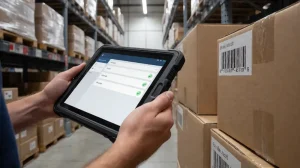
Manufacturing and logistics operations rely on specialized rugged Android devices from manufacturers like Zebra, Honeywell, and CAT. These devices operate in harsh environments (warehouses, outdoor loading docks, factory floors) requiring specific MDM capabilities:
- Support for manufacturer-specific management protocols (Zebra LifeGuard, Honeywell device management APIs)
- Barcode/RFID scanning integration for warehouse management systems
- High-latency network tolerance for devices operating in RF-shielded areas
- Battery optimization for devices requiring 12+ hour operational periods
A global logistics company managing 10,000 warehouse devices across 50 facilities deployed Android MDM with Zebra device support. Result: 45% reduction in device downtime, 25% improvement in package throughput, and 99.2% device availability during peak seasons.
Finance & Banking: Secure BYOD Programs
Financial institutions implement Android MDM for secure BYOD programs enabling employees to access banking systems from personal devices. Regulatory requirements include:
- Work Profile Isolation: Separate personal and banking data using Android Enterprise work profiles
- PCI-DSS Compliance: Enforce encryption for payment card data, restrict screenshot/recording capabilities
- Conditional Access: Require MFA, device encryption, and current security patches before banking app access
- Selective Wipe: Remove only banking data if device is lost, leaving personal data intact
A major US bank deployed Android MDM for 15,000 BYOD devices, enabling employees to access trading platforms and customer databases from personal smartphones. Implementation required 16 weeks with compliance validation. Result: 99.8% compliance with PCI-DSS requirements, zero unauthorized access incidents in first year.
5. How to Choose the Right Android MDM Solution
Key Evaluation Criteria
Selecting appropriate Android MDM solutions requires systematic evaluation across multiple dimensions:
Platform Support: Determine if you need Android-only management or cross-platform support (iOS, Windows, macOS). Standalone Android MDM solutions typically cost 30-40% less than cross-platform UEM solutions but provide less integration for organizations with mixed device environments.
Deployment Options: Evaluate cloud-based, on-premise, and hybrid deployment models. Cloud solutions offer faster implementation (2-4 weeks) and lower infrastructure costs; on-premise solutions provide maximum data control for sensitive environments. Hybrid deployments balance both requirements but introduce operational complexity.
Pricing Models: Compare per-device ($2-$15/month), per-user ($5-$20/month), and flat-rate pricing ($500-$5,000+/month). For organizations with 100-500 devices, per-device pricing typically proves most cost-effective. Enterprise deployments (1,000+ devices) benefit from flat-rate or per-user models with volume discounts.
Support & SLA: Verify support availability in your operational time zones. MDM vendor support SLA response time Enterprise deployments require 24/7 support with 4-hour response SLAs for critical issues. Regional considerations: US vendors typically offer 24/7 US support; EU vendors provide GDPR-compliant support with EU-based teams; APAC organizations often require local support presence.
Procurement Best Practice: Evaluate MDM solutions through structured pilots (100-200 devices for 30-60 days) before enterprise commitment. Pilot phases identify integration challenges, user adoption barriers, and performance issues before organization-wide deployment.
MDM vs. UEM: When You Need More Than Android
Organizations managing diverse device environments (Android phones, iOS tablets, Windows laptops, macOS desktops) should evaluate Unified Endpoint Management (UEM) solutions that consolidate all endpoint management into single platforms. UEM solutions provide:
- Unified policy framework across all device types
- Consolidated compliance reporting and audit trails
- Single management console reducing IT training requirements
- Integrated app distribution for all platforms
However, UEM solutions typically cost 40-60% more than standalone Android MDM and introduce unnecessary complexity for organizations with primarily Android deployments. Decision framework: Choose MDM if 80%+ of devices are Android/iOS; upgrade to UEM if you manage significant Windows/macOS populations or require desktop management.
6. Android MDM Implementation: Step-by-Step Guide
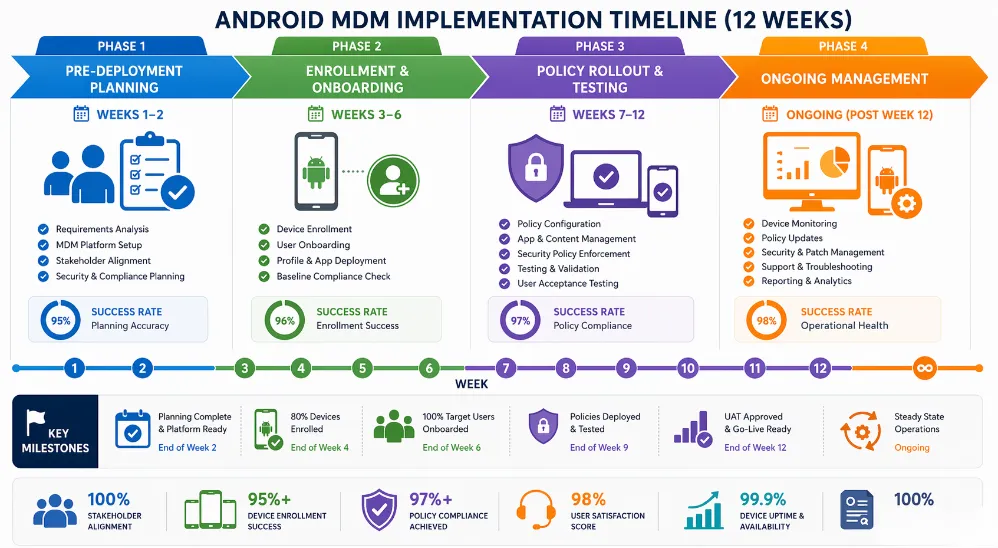
Pre-Deployment Planning (Weeks 1-2)
Successful Android MDM implementations begin with thorough planning:
Device Inventory & Compatibility Audit: Catalog all existing Android devices, document OS versions, manufacturers, and current management status. Verify MDM vendor support for each device model and Android version. Identify devices requiring upgrades or replacement (e.g., Android 7.0 or earlier with limited MDM capabilities).
Policy Framework Development: Collaborate with security, compliance, and business teams to define organizational policies. Policy templates should address:
- Password complexity and rotation requirements
- Encryption and VPN enforcement
- App whitelist/blacklist specifications
- Compliance and audit requirements
- Incident response and remote wipe procedures
User Communication & Training Plan: Develop clear messaging explaining MDM benefits, addressing privacy concerns, and providing enrollment instructions. android MDM user adoption strategy Organizations that invest in comprehensive user communication achieve 90%+ voluntary enrollment rates; those with minimal communication experience 30-40% adoption resistance.
Enrollment & Onboarding (Weeks 3-6)
Phased enrollment approach minimizes disruption and identifies issues early:
Pilot Phase (100-200 devices): Enroll IT staff and early adopters first. Document enrollment success rates, identify technical issues, and refine user documentation. Expected pilot success rate: 85-95%.
Early Adoption Phase (500-1,000 devices): Expand to department champions and tech-savvy employees. Monitor enrollment metrics, gather user feedback, and optimize support processes.
Organization-Wide Rollout: Implement across remaining devices with targeted support for high-risk groups (executives, field workers, remote employees).
Policy Rollout & Testing (Weeks 7-12)
Gradual policy deployment prevents productivity disruption:
Week 1-2: Deploy basic security policies (password, encryption) that typically require no behavior changes.
Week 3-4: Deploy app management policies with advance notice to employees about app restrictions.
Week 5-6: Monitor policy compliance, address exceptions, and document lessons learned.
US organizations can implement faster (8-12 weeks); EU organizations require additional compliance validation (12-16 weeks); APAC deployments often extend to 16-20 weeks due to language localization and local partner coordination.
7. Android MDM Security & Compliance Framework
Regional Compliance Requirements
GDPR (Europe): Organizations processing EU resident data must ensure:
- Data residency in EU data centers (no US data transfer without adequacy determination)
- Data Processing Agreements (DPA) with MDM vendors
- Right to deletion mechanisms for employee data
- Transparent privacy policies explaining MDM scope
HIPAA (United States – Healthcare): Healthcare organizations require:
- Business Associate Agreements (BAA) with MDM vendors
- Encryption for all PHI in transit and at rest
- Audit trails for all PHI access
- Automatic device wipe for non-compliance
PCI-DSS (Payment Industry): Organizations processing payment card data need:
- Secure payment app isolation from other applications
- Encryption for payment transaction data
- Network segmentation preventing payment app data access by other apps
- Regular security assessments and penetration testing
SOC2, ISO27001, FedRAMP Certifications: Verify MDM vendor holds relevant certifications for your industry and regulatory environment. Request current audit reports and security assessment documentation.
Data Protection & Encryption
android MDM encryption standards compliance Enterprise Android MDM enforces device-level encryption preventing unauthorized data access even if devices are physically compromised. Encryption mechanisms include:
- Full Device Encryption: Encrypts entire device storage with AES-256 or equivalent
- File-Based Encryption: Encrypts individual files and folders with varying encryption keys
- VPN Encryption: Encrypts all network traffic through corporate VPN
- App-Level Encryption: Encrypts sensitive data within specific applications
Threat Detection & Response
Advanced Android MDM solutions integrate threat detection capabilities that identify and respond to security incidents:
- Real-time Monitoring: Continuous device health monitoring detecting anomalies within seconds
- Incident Response Automation: Automatic remediation actions (device isolation, app removal, data wipe)
- SIEM Integration: Forward security events to centralized security platforms for correlation and analysis
- Threat Intelligence: Leverage threat feeds identifying known malware and suspicious app behavior
8. Android MDM ROI: Calculating Total Cost of Ownership
Cost Components
Comprehensive Android MDM ROI analysis must account for all cost categories:
Software Licensing: $2-$15/device/month (per-device), $5-$20/user/month (per-user), or $500-$5,000+/month (flat-rate). Calculate 3-year licensing costs based on your device count and pricing model.
Implementation & Professional Services: $10,000-$100,000+ depending on complexity, number of devices, and integration requirements. Budget 8-16 weeks of implementation time.
Training & Change Management: $5,000-$50,000 for user training, IT staff certification, and change management activities.
Infrastructure Costs: Cloud-based solutions include hosting in vendor pricing; on-premise solutions require server infrastructure, networking, and maintenance ($20,000-$200,000 capital investment).
Integration Costs: API development, third-party tool integration, and custom workflow development ($10,000-$50,000).
Support & Maintenance: Annual support contracts typically cost 15-20% of software licensing.
ROI Metrics & Benefits
IT Staff Time Savings: Automated device management, policy deployment, and troubleshooting reduce IT workload by 30-40%. Organizations managing 1,000+ devices typically save 0.5-1.0 FTE annually.
Security Incident Reduction: Comprehensive MDM reduces security incidents by 60-80%, avoiding average breach costs of $3.9 million. Even preventing single major breach justifies MDM investment.
Compliance Violation Avoidance: Automated compliance monitoring prevents regulatory violations costing $100,000-$1,000,000+ per incident.
Employee Productivity: Faster device deployment, reduced downtime, and improved support response times improve employee productivity by 5-15%.
Typical ROI Timeline: Organizations implementing Android MDM across 500+ devices typically achieve ROI within 6-18 months. Payback periods vary based on current device management costs, security incident history, and regulatory environment.
9. Migrating to a New Android MDM Solution
Organizations upgrading from legacy MDM systems face migration complexity. Successful migration requires:
Audit Current Setup: Document all existing policies, device groups, user assignments, and app distributions. Export configuration data from legacy MDM system.
Map to New Platform: Translate legacy policies to new MDM’s policy language. Test policy compatibility on pilot device groups.
Phased Re-enrollment: Unenroll devices from legacy MDM gradually, re-enroll in new system by department or location. Minimize disruption by scheduling during maintenance windows.
Validation & Optimization: Verify policies apply correctly, apps install successfully, and compliance reporting functions properly on new platform.
Typical migration timeline: 2-8 weeks depending on device count and complexity. Organizations managing 5,000+ devices should allocate 8-12 weeks.
10. Common Android MDM Issues & Solutions
Enrollment Failures: Most common causes include network connectivity issues, incorrect account credentials, or device incompatibility. Solutions: Pre-flight network tests, clear enrollment instructions, device compatibility verification.
Policy Not Applying: Policies may not apply due to caching delays, device reboots required, or manufacturer-specific restrictions. Solutions: Force policy sync, verify device compatibility, check manufacturer-specific policy support.
App Installation Failures: Managed Google Play errors, insufficient device storage, or network issues prevent app installation. Solutions: Free device storage, verify app availability in Managed Google Play, test on pilot devices before organization-wide deployment.
Device-Specific Issues: Samsung Knox devices may require manufacturer-specific management protocols; Huawei devices without Google Play Services require alternative app distribution methods; rugged devices need specialized enrollment procedures.
Conclusion & Getting Started with Android MDM
Android Mobile Device Management has evolved from optional nice-to-have to mandatory enterprise infrastructure. Organizations managing distributed Android fleets face regulatory requirements, security threats, and operational complexity that demand comprehensive MDM solutions.
Whether you’re managing healthcare devices requiring HIPAA compliance, retail POS terminals needing kiosk functionality, or field worker fleets requiring offline support, Android MDM provides proven solutions. Implementation requires 8-16 weeks, costs $50,000-$500,000+ depending on scale, but delivers 6-18 month ROI through security incident reduction, compliance violation avoidance, and IT efficiency gains.
Start with structured pilot programs (100-200 devices for 30-60 days) to validate vendor capabilities, assess user adoption, and identify integration requirements before organization-wide deployment. Successful Android MDM implementations combine technology, change management, and ongoing optimization to deliver sustainable security and operational benefits.
Tags: android enterprise management platform, android MDM enrollment best practices, android MDM policy push performance, MDM vendor support SLA response time, retail MDM kiosk mode management