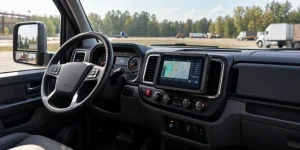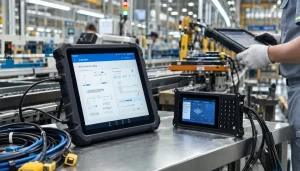
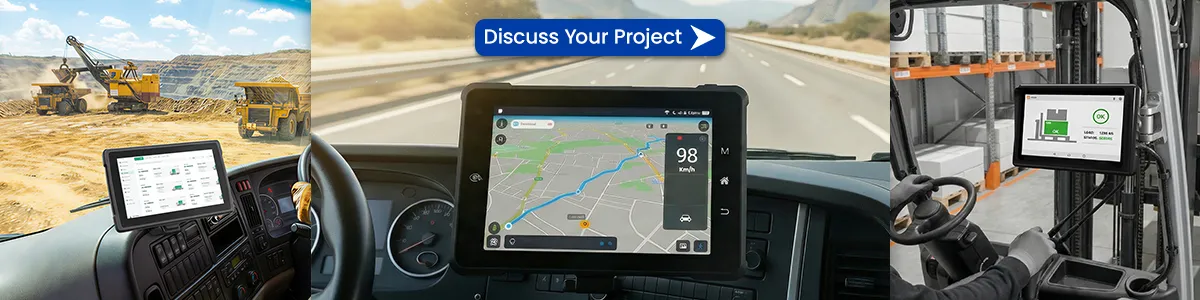
An on-board computer (also written as onboard computer or OBC) is a specialized, embedded computing system installed inside a vehicle, satellite, aircraft, ship or industrial machine. Unlike a regular desktop or laptop, an OBC is purpose-built to perform specific real-time tasks — monitoring sensors, controlling subsystems, processing data and communicating with external systems — often in harsh environments.
In modern vehicles and fleets, the on-board computer acts as the “brain” that ties engine management, safety systems, telematics, navigation and driver interfaces together. In satellites and aerospace applications, it handles attitude control, command execution, telemetry and fault recovery.

What Does an On-Board Computer Do?
Typical functions of an on-board computer include:
- Real-time data acquisition from sensors (speed, fuel, temperature, GPS, pressure, etc.)
- Control of actuators and subsystems (engine, brakes, transmission, climate, lights)
- Diagnostics and health monitoring (OBD-II / J1939 fault codes)
- Communication with fleet management platforms, dispatch centers or ground stations
- Driver / operator interface (display, alerts, digital forms, ELD logging)
- Data logging, edge computing and predictive maintenance
Key Components of an On-Board Computer
Most OBCs share a common architecture:
| Component | Role | Typical Specs in Vehicle Use |
|---|---|---|
| Processor (CPU / MCU / MPU) | Core computation | Multi-core ARM, Intel Atom, or radiation-hardened |
| Memory | RAM for runtime + Flash/ROM for firmware | 2–16 GB RAM, industrial-grade storage |
| Interfaces | Connect to vehicle & peripherals | CAN Bus, OBD-II, RS232/485, Ethernet, GPIO, USB |
| Connectivity | Data transmission | 4G/5G LTE, Wi-Fi, Bluetooth, GNSS/GPS |
| Power Management | Stable operation under vehicle voltage | 9–36V DC wide-range input, ignition sense |
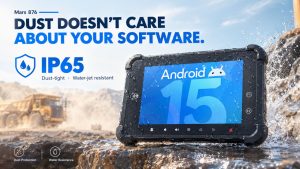
| Rugged Enclosure | Survive vibration, dust, temperature | IP65/IP67, MIL-STD-810H |
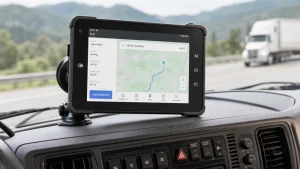
In commercial fleets and industrial vehicles, many companies now use rugged vehicle-mounted tablets or Mobile Data Terminals (MDTs) as the practical form of on-board computers because they combine computing power, a sunlight-readable display and vehicle interfaces in one unit.
On-Board Computer vs Regular Computer vs ECU
- Regular PC / Tablet: Designed for office or consumer use. Not vibration-resistant, limited temperature range, no native vehicle bus support.
- ECU (Electronic Control Unit): Traditional single-function controllers (engine ECU, ABS ECU). Modern vehicles are consolidating many ECUs into more powerful domain controllers or central on-board computers.
- On-Board Computer / In-Vehicle Computer: Broader embedded system that can handle multiple domains, run applications (Android/Windows/Linux), support telematics software and provide a human-machine interface.
Applications of On-Board Computers
1. Passenger Cars & Commercial Vehicles
OBCs manage engine performance, fuel efficiency, ADAS features, infotainment and safety systems (ABS, airbags, stability control).
2. Fleet Management & Logistics
Real-time GPS tracking, driver behavior monitoring, fuel analysis, electronic logging (ELD), route optimization and dispatch integration. Rugged tablets with CAN Bus / OBD-II become the on-board computer for many fleets.
3. Public Transit, Taxis & Emergency Vehicles
Passenger information systems, fare collection, MDT functions for police/ambulance, video surveillance integration.
4. Mining, Construction, Agriculture & Forklifts
Harsh-environment operation, equipment health monitoring, productivity tracking and safety interlocks.
5. Satellites & Aerospace (CubeSats and larger platforms)
Attitude and orbit control, telecommand execution, telemetry packaging, fault detection/isolation/recovery (FDIR). Space-grade OBCs use radiation-hardened processors and redundancy.
6. Industrial Displays & OPS Systems
Some digital signage and industrial monitors use Open Pluggable Specification (OPS) slots so an OBC can be plugged directly into the display.
Why Rugged On-Board Computers Matter for Fleets
Consumer tablets fail quickly under constant vibration, extreme temperatures, dust and 24/7 power cycles. Purpose-built on-board computers and vehicle-mounted rugged tablets offer:
- Wide operating temperature (−20 °C to +70 °C or wider)
- Shock and vibration resistance (MIL-STD-810H)
- Dust/water protection (IP65+)
- Native vehicle power and bus interfaces
- Long product lifecycle and enterprise management (MDM)
These advantages translate into lower total cost of ownership, higher uptime and better compliance (ELD, safety regulations).
Frequently Asked Questions
What is the full form of OBC?
OBC stands for On-Board Computer (or Onboard Computer).
Is an on-board computer the same as a car computer?
In everyday language yes, but technically a modern vehicle contains multiple computers. The term “on-board computer” often refers to the central or domain computing platform, while individual ECUs handle specific functions.
Can I use a regular tablet as an on-board computer?
Technically possible for light applications, but not recommended for professional fleets due to reliability, mounting, power and vehicle-interface limitations.
What is the difference between OBC and OBU?
OBC = On-Board Computer (general computing platform).
OBU = On-Board Unit (usually refers to a dedicated device for electronic toll collection or V2X communication).
Ready to Choose the Right On-Board Computer Solution?
Whether you need a compact 7-inch vehicle terminal for trucks, a high-performance in-vehicle computer for public transit, or a fully rugged MDT for mining and construction, selecting the correct hardware is critical.
Explore Waysion’s range of rugged vehicle tablets and mobile data terminals designed specifically as reliable on-board computers for demanding environments.
[Get a Quote] or contact our team for OEM/ODM customization.
Last updated: September 2026
Tags: Aircraft Computer, Avionics Computer, Cockpit Computer, Embedded Computer System, In-flight Computer, On-board tablet