- Introduction: Why the Right ELD Tablet Matters More Than Ever
- What Is an ELD Tablet?
- Consumer Tablet vs. Rugged ELD Tablet: The Real Comparison
- 8 Must-Have Features in an ELD Tablet
- ELD Tablet Use Cases Across Fleet Operations
- Total Cost of Ownership: The Number That Ends the Debate
- How to Choose: A 6-Step ELD Tablet Checklist
- Deployment Best Practices for Fleet Managers
- 2026 Trends in ELD Tablets
- Frequently Asked Questions
- Conclusion: Compliance Is the Floor — Efficiency Is the Win
Introduction: Why the Right ELD Tablet Matters More Than Ever
Since the FMCSA’s Electronic Logging Device (ELD) mandate took full effect, every commercial driver operating a CMV subject to Hours of Service (HOS) rules must use a registered, compliant ELD. But here’s what many fleet managers discover too late: the ELD hardware is only half the equation — the tablet displaying it is where compliance succeeds or fails.
A cheap consumer tablet that crashes mid-route, dies before the end of a shift, or becomes unreadable in direct sunlight doesn’t just frustrate drivers. It puts your fleet at risk of DOT violations, fines up to $13,000+ per violation, and out-of-service orders that strand trucks and drivers on the roadside.
This guide covers everything fleet operators, owner-operators, and dispatch managers need to know about ELD tablets: what the FMCSA actually requires, rugged vs. consumer devices, must-have features, real costs, and deployment best practices.
What Is an ELD Tablet?
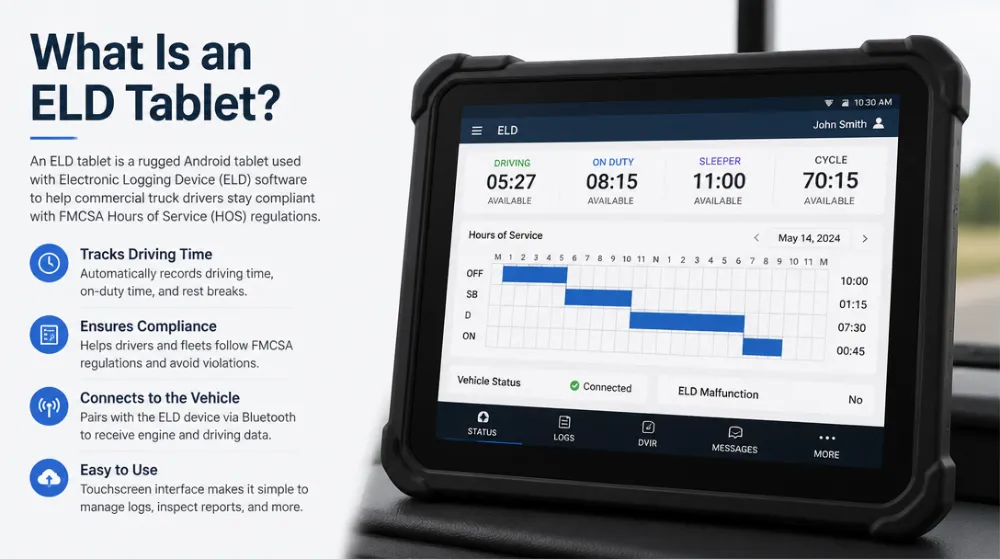
An ELD tablet is the mobile device that runs FMCSA-registered ELD software and displays it to the driver, synced with an engine-connected ELD hardware unit (via Bluetooth, USB, or cellular). The complete system typically includes:
- ELD hardware — connects to the engine’s ECM (J1939/J1708/OBD-II port)
- ELD software — FMCSA-registered application for HOS logs, RODS, inspections
- Display device — the tablet or smartphone the driver interacts with
While FMCSA rules technically permit smartphones, most professional fleets standardize on tablets for three reasons: larger screens for roadside inspections, better connectivity reliability, and easier mounting in cabs.
What the FMCSA Actually Requires from Your Display Device
The regulation (49 CFR Part 395, Appendix A) requires the ELD system to:
- Display RODS (Records of Duty Status) on demand for authorized safety officials
- Transfer data via USB or Bluetooth 2.0+ during roadside inspections
- Show the driver’s status, remaining drive/on-duty time clearly
- Continue recording even if the display device fails (the ELD unit keeps logging)
- Support annotations, edits with reasons, and driver certification
Key insight: The ELD unit itself keeps recording if the tablet dies — but a dead tablet means the driver can’t display logs during an inspection, which can trigger violations. Reliability isn’t optional.
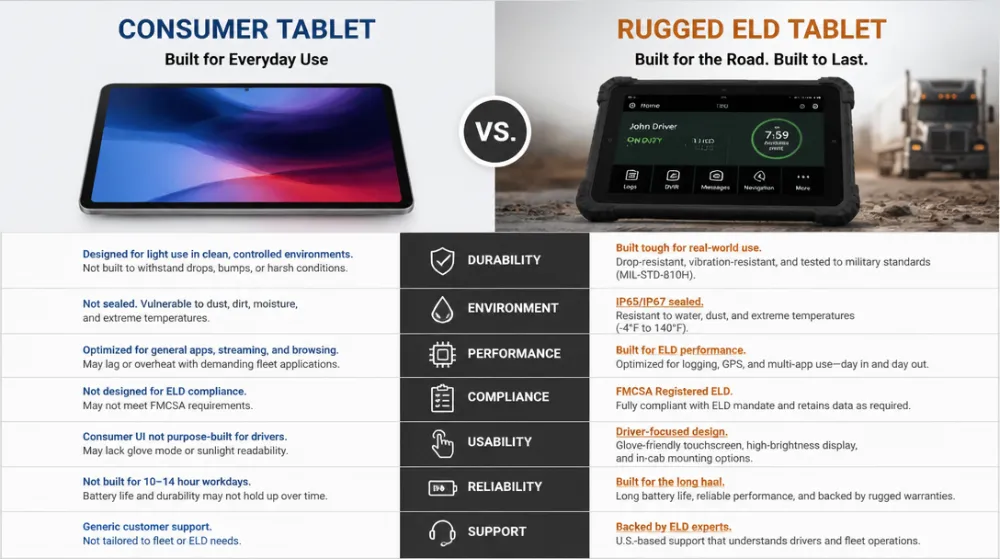
Consumer Tablet vs. Rugged ELD Tablet: The Real Comparison
| Feature | Consumer Tablet | Rugged ELD Tablet |
|---|---|---|
| Drop survival | None–1.2 m | 1.8 m+ (MIL-STD-810H) |
| Ingress protection | None | IP65–IP68 |
| Sunlight-readable screen | Rarely | 800–1000+ nits |
| Operating temp | 0–35°C | -20 to 60°C (hot cabs, cold yards) |
| Battery life (real use) | 6–10 hrs, degrades fast | 10–15+ hrs, hot-swappable options |
| Vibration tolerance | Poor (truck cab = constant shake) | MIL-STD vibration certified |
| 3-year failure rate | ~30–50% | <5% |
| Lifecycle/parts support | 12–18 months | 3–5 years |
| PD 60-minute rule risk | Higher | Lower |
The vibration problem most buyers miss: Consumer tablet connectors (especially charging ports) frequently fail from constant truck vibration — even when the device “survives.” Pogo-pin vehicle docks on rugged tablets eliminate this failure mode entirely.
8 Must-Have Features in an ELD Tablet
1. FMCSA-Compliant Data Transfer
Native Bluetooth 2.0+ and USB support for roadside inspection transfers. Test this before rollout — failed data transfers are among the most common roadside pain points.
2. All-Day, Vibration-Proof Power
- 10+ hours of real-world runtime (screen on, GPS and cellular active)
- Hot-swappable batteries for team drivers and multi-shift operations
- Vehicle dock charging via pogo pins (not USB ports that wear out)
3. Sunlight-Readable, Glove-Friendly Display
- 800+ nits brightness for cab visibility
- Glove-touch and wet-touch support for yard work in winter
- 8–10″ screen: big enough for inspectors to read, small enough for cab mounting
4. Integrated Connectivity
- 4G LTE/5G with dual SIM for fleet-wide coverage across carriers
- Wi-Fi 6 for yard and terminal hotspots
- GPS/GNSS for automatic driving-time detection and IFTA mileage capture
5. Beyond ELD: One Device, Multiple Workflows
The smartest fleets pick tablets that do more than logging:
- Document scanning (BOLs, PODs, lumper receipts) via camera or built-in scanner
- eSignature capture for proof of delivery
- DVIR (Driver Vehicle Inspection Reports) completion
- Navigation and dispatch integration (Samsara, Motive, Trimble, Oracle, etc.)
Every additional workflow consolidated onto the tablet reduces per-truck hardware count and driver app-switching.
6. Cold Weather and Hot Cab Durability
Cabs hit 60°C+ in summer parking lots and -20°C in winter yards. Consumer lithium batteries throttle shut down; rugged tablets are rated for the full range.
7. Security and Remote Management
MDM support (Microsoft Intune, SOTI MobiControl, Esper) for remote lock, wipe, app deployment, and kiosk mode — so drivers only see the apps they need.
8. Mountable, Inspectable Form Factor
Ram-mount or custom dock compatibility, physical home/buttons usable with gloves, and a screen an inspector can read without the driver unmounting the device.
ELD Tablet Use Cases Across Fleet Operations
Long-Haul Trucking
HOS compliance, electronic DVIRs, digital BOL capture, and e-signature PODs — one tablet replaces the logbook, clipboard, camera, and scanner.
Team Drivers & Sleeper Cabs
Hot-swappable batteries mean continuous operation across shifts without docking downtime.
Regional & Last-Mile Fleets
Frequent stop-and-go means maximum screen wake/sleep cycles and mounting strain — ruggedized connectors and docks pay off fastest here.
Construction & Heavy Equipment
Non-road vehicles may be exempt from ELD mandates, but many operators deploy ELD-capable tablets anyway for job costing, asset tracking, and timesheet automation.
School Bus & Transit Fleets
Pre-trip inspection digitization, student manifest management, and route compliance on a single mounted device.
Total Cost of Ownership: The Number That Ends the Debate
Sample: 25-truck fleet, 3-year horizon.
| Cost factor | Consumer tablets | Rugged ELD tablets |
|---|---|---|
| Hardware (25 units) | 6,250 | 18,750 |
| Replacements & failures | 7,500 | 1,900 |
| Docks/mounts replaced | 3,000 | 600 |
| IT support & downtime | 9,000 | 2,800 |
| Violation/downtime risk (conservative est.) | 5,000 | 1,000 |
| 3-year total | 30,750 | 25,050 |
Add the productivity gains — faster inspections, paperless document capture, fewer out-of-service events — and rugged ELD tablets typically break even within 12–24 months.
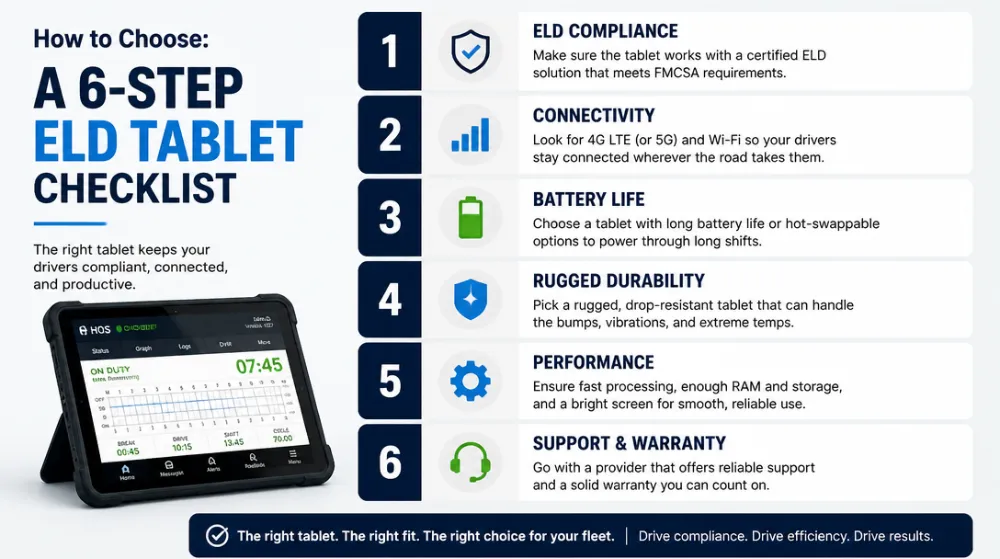
How to Choose: A 6-Step ELD Tablet Checklist
- Confirm ELD software compatibility — verify your ELD provider (Motive, Samsara, Geotab, KeepTruckin, Garmin, etc.) supports the tablet OS and model
- Define your environment — regional climate, road vibration, mounted vs. handheld use
- Map secondary workflows — scanning, signatures, navigation, DVIR — and consolidate
- Check connectivity coverage — match carrier/SIM strategy to your routes (US/Canada/Mexico)
- Plan the mounting ecosystem — vehicle docks, chargers, spare batteries, windshield/ram mounts
- Pilot 3–5 units for 30 days — measure battery life per shift, inspection transfer success, driver feedback, failure incidents
Deployment Best Practices for Fleet Managers
- Kiosk mode via MDM — lock tablets to approved apps to prevent distraction-related violations and driver misuse
- Standardize one model fleet-wide — simplifies spares, docks, and training
- Train for the roadside inspection — every driver should complete a mock inspection including data transfer within the first week
- Automate tablet provisioning — zero-touch enrollment gets new devices dispatch-ready in minutes
- Track KPIs post-rollout: log edit rates, inspection violation counts, tablet uptime, document cycle time
2026 Trends in ELD Tablets
- Speed limiters & enhanced HOS scrutiny — FMCSA rulemaking makes audit-ready data quality more valuable
- AI-powered document capture — instant BOL/POD indexing straight into TMS platforms
- Private 5G & eSIM — seamless cross-border connectivity for US–Mexico–Canada corridors
- Dashcam & ADAS consolidation — tablets becoming the hub for video telematics displays
- Sustainability pressure — repairable, modular rugged tablets replacing annual consumer-device churn
Frequently Asked Questions
Q1: Can I use a regular iPad or Android tablet as an ELD display device?
Technically yes, if it runs FMCSA-registered ELD software and supports Bluetooth/USB data transfer. But consumer devices fail at 3–5x the rate of rugged tablets in cab environments, creating inspection and downtime risks that cost far more than the hardware savings.
Q2: What size ELD tablet is best?
8–10 inches is the sweet spot: readable for inspectors, mountable in any cab, and manageable for handheld document capture.
Q3: Does the ELD still record if the tablet dies?
Yes — the ELD hardware unit keeps logging. But the driver can’t display logs during an inspection until the display works again, which risks violations. Hot-swappable batteries eliminate this exposure.
Q4: Which ELD software works with rugged tablets?
Most major providers (Motive, Samsara, Geotab, Garmin eLog, Switchboard) support both Windows and Android rugged tablets — but always confirm model-level compatibility before purchasing.
Q5: How long should an ELD tablet last?
A rugged ELD tablet should deliver 5+ years of service; consumer tablets typically need replacement within 18–24 months in commercial vehicle environments.
Conclusion: Compliance Is the Floor — Efficiency Is the Win
Any FMCSA-registered ELD keeps you legal. But the right ELD tablet turns a compliance requirement into a fleet-wide productivity platform: faster inspections, paperless freight documents, digitized DVIRs, and drivers who aren’t fighting their hardware every shift.
Start with a small pilot, measure inspection transfer success and device uptime, and scale what proves itself.
📩 Request a free fleet consultation and ELD tablet compatibility check today.
Tags: ELD tablet for trucks, motive eld tablet