
- Should You Use Direct Wiring or a Docking Station to Power a Vehicle Tablet Safely?
- Understanding Vehicle Tablet Power Requirements
- What Are the Core Differences Between Direct Wiring and Docking Stations?
- How Do You Safely Implement Direct Wiring?
- What Safety Risks Exist with Each Approach?
- Comparative Safety & Performance Analysis
- How Do You Choose Between the Two Approaches?
- What Are Best Practices for Docking Station Selection?
- How Should You Maintain Your Tablet Power System?
- Frequently Asked Questions
- Converting Insights into Action
Should You Use Direct Wiring or a Docking Station to Power a Vehicle Tablet Safely?
Powering a vehicle tablet safely requires choosing between direct wiring and docking stations based on your specific needs. Direct wiring offers permanent, reliable power but requires professional installation and creates integration complexity; docking stations provide flexibility, easier maintenance, and user-friendly operation but demand regular charging management. For most drivers, a quality docking station with surge protection is the safer, more practical choice. However, commercial fleets and ride-sharing services benefit from direct wiring with proper fusing, voltage regulation, and professional installation. The key to safety lies in using quality components, implementing proper electrical protection, maintaining correct voltage delivery (12V/24V), and regular system inspections. Combining either method with auxiliary battery backups can enhance reliability by 30-40% while protecting your vehicle’s electrical system.
Understanding Vehicle Tablet Power Requirements
Vehicle tablets—whether used for navigation, fleet management, driver communication, or in-vehicle entertainment—require reliable, stable power without draining or damaging your vehicle’s electrical system. The stakes are high: inadequate power leads to system shutdowns mid-journey; improper wiring can cause electrical fires, battery drain, or component damage.
Most modern vehicle tablets consume 10-25W during operation, though some high-performance units exceed 40W. Your vehicle’s electrical system operates at either 12V (standard vehicles) or 24V (heavy trucks), and delivering the correct voltage safely involves more complexity than simply connecting a wire.
The choice between direct wiring and docking stations isn’t just about convenience—it’s fundamentally about safety, reliability, and long-term vehicle health.
What Are the Core Differences Between Direct Wiring and Docking Stations?
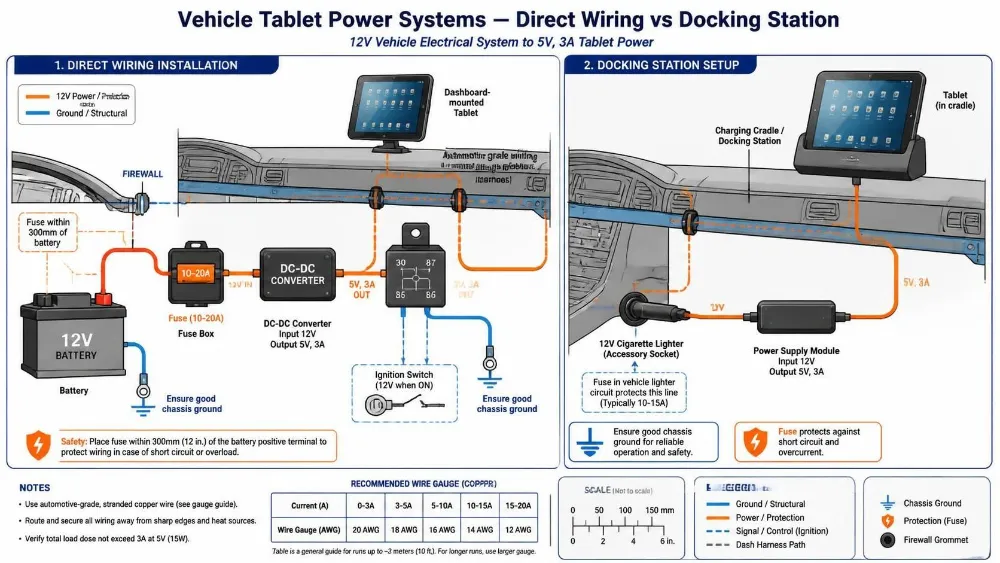
Direct wiring integrates tablet power directly into your vehicle’s electrical system, offering permanent, maintenance-free operation but requiring professional installation and creating potential safety risks if improperly executed. Docking stations charge tablets independently from vehicle power, providing flexibility and easier troubleshooting but requiring regular charging management and occupying dashboard space.
Direct Wiring Architecture
Direct wiring connects the tablet’s charging port or power input directly to your vehicle’s battery through a properly fused circuit. The system includes:
- Fuse/Circuit Breaker: Protects against overcurrent (typically 10-20A depending on tablet power requirements)
- Voltage Regulator: Converts 12V/24V vehicle power to the tablet’s required voltage (typically 5V or USB-C standard)
- Wiring Harness: Professional-grade automotive wiring (AWG 10-14 depending on current) routed through vehicle interior
- Switch/Relay: Controls power delivery, often integrated with vehicle ignition system
Docking Station Architecture
A docking station operates as an independent device:
- Charging Cradle/Connector: Physically holds tablet and establishes electrical connection
- Internal Power Supply: Converts vehicle 12V power to tablet-required voltage
- Battery Backup (optional): Maintains tablet power during vehicle shutdown
- Surge Protection: Protects tablet from voltage spikes
The docking station connects to vehicle power through either a 12V cigarette lighter socket or direct wiring to the battery.
Key Operational Differences
| Aspect | Direct Wiring | Docking Station |
|---|---|---|
| Installation | Professional, permanent | DIY possible, removable |
| Setup Time | 2-4 hours | 15-30 minutes |
| Cost | $150-400 (parts + labor) | $50-200 |
| Maintenance | Minimal after installation | Regular connector cleaning |
| Portability | Tablet can be removed easily | Station remains in vehicle |
| Troubleshooting | Complex, requires electrical expertise | Simple, user-serviceable |
| Safety Risk | Higher if improperly installed | Lower, isolated from vehicle system |
| Power Delivery | Continuous while vehicle running | Continuous or battery-dependent |
How Do You Safely Implement Direct Wiring?
Safe direct wiring requires professional installation with proper fusing (10-20A), voltage regulation to exact tablet specifications, automotive-grade wiring, and integration with vehicle ignition systems—attempting this without electrical expertise creates fire and electrical damage risks.
Direct wiring offers the most seamless user experience—your tablet charges automatically whenever the vehicle runs—but the installation process demands precision and expertise.
Step 1: Determine Power Requirements
Before any installation, identify your tablet’s exact specifications:
- Input voltage (5V, 9V, 12V, or USB-C Power Delivery specification)
- Maximum charging current (typically 2-3A for most tablets)
- Total power consumption (watts = volts × amps)
A tablet requiring 5V @ 3A needs 15W of power. Your vehicle’s 12V system can safely supply this through a properly regulated circuit.
Step 2: Select Appropriate Fusing
Fusing is your primary safety mechanism. The fuse protects against short circuits that could cause fires. Calculate fuse rating using the formula:
Fuse Rating=1Maximum Current×1.25
For a 3A tablet charger, use a 5A fuse. For a 15A circuit (multiple devices), use a 20A fuse. Never upsize fuses beyond this calculation—oversized fuses defeat their protective purpose.
Step 3: Install Voltage Regulation
Your vehicle’s 12V system actually fluctuates between 11V (at startup) and 14.5V (during charging). Most tablets require stable 5V ± 0.5V. A quality DC-DC converter or automotive USB charger maintains this stability.
Professional installers use:
- Isolated DC-DC Converters ($80-150): Best for mission-critical applications, provides electrical isolation
- Automotive USB Chargers ($30-80): Standard for consumer applications, adequate for most tablets
- Integrated Charging Modules ($100-200): Purpose-built for specific vehicle models
Step 4: Route Wiring Professionally
This is where amateurs often create hazards:
- Wire Gauge: Use appropriate AWG (American Wire Gauge) based on current and distance. For 15A at 10 feet, use AWG 10. For 5A at 10 feet, use AWG 14.
- Routing: Never route power wires near heat sources, sharp edges, or moving components. Professional installers use conduit and secure wiring with adhesive clips every 12 inches.
- Connection Points: Use crimped connectors (never solder in automotive applications—solder joints fail under vibration). All connections should be sealed with dielectric grease to prevent corrosion.
Step 5: Integrate with Vehicle Systems
The safest installations include:
- Ignition-Controlled Power: Tablet charges only when vehicle is running, preventing battery drain
- Relay Control: A relay switches power on/off based on vehicle ignition state, protecting against accidental discharge
- Secondary Battery Monitoring: Optional integration with vehicle battery management to disable tablet charging if battery voltage drops below safe thresholds
Installation Checklist
- Tablet power specifications verified
- Fuse rating calculated and installed
- Voltage regulator tested before installation
- Wire gauge appropriate for current and distance
- All connections crimped and sealed
- Wiring routed away from heat/moving parts
- Ignition control relay installed
- System tested with tablet under full load
- Documentation provided for future troubleshooting
What Safety Risks Exist with Each Approach?
Direct wiring risks include electrical fires (if improperly fused), battery drain (if not ignition-controlled), and component damage (from voltage spikes). Docking stations risk tablet damage from poor connector design, but isolate the vehicle electrical system from these failures.
Direct Wiring Risks
Electrical Fire Hazard: This is the most serious risk. If wiring insulation is damaged or connections are loose, resistance increases, generating heat. In extreme cases, this can ignite surrounding materials. Proper fusing and professional installation reduce this risk to near-zero, but DIY attempts carry significant fire risk.
Battery Drain: If your direct wiring lacks ignition control, the tablet continues charging even when the vehicle is off, potentially draining your battery in 12-24 hours. This is particularly problematic in cold climates where battery capacity is already reduced.
Voltage Spike Damage: Vehicle electrical systems experience voltage spikes during engine startup (up to 18V for brief moments) and when the alternator cycles. Without proper protection, these spikes damage tablet charging circuits. Quality voltage regulators include transient suppression, but cheap converters don’t.
Ground Loop Issues: Improper grounding can create electrical noise that interferes with tablet operation or vehicle systems. Professional installers use dedicated ground points (typically the vehicle chassis near the battery), not random body panels.
Docking Station Risks
Connector Wear: Repeated insertion/removal degrades connectors. After 500-1,000 cycles, connectors may fail to maintain proper contact, causing intermittent charging or accidental disconnection while driving.
Poor Quality Power Supplies: Cheap docking stations use unregulated power supplies that deliver unstable voltage, potentially damaging tablet batteries. Look for docking stations with certified power supplies (UL, FCC, CE marks).
Overheating: Docking stations with inadequate thermal design can overheat during fast charging, reducing battery lifespan by 20-30% or causing thermal shutdowns mid-journey.
Loose Mounting: Improperly mounted docking stations can shift during acceleration/braking, potentially damaging tablet connectors or causing the tablet to fall during emergency maneuvers.
Comparative Safety & Performance Analysis
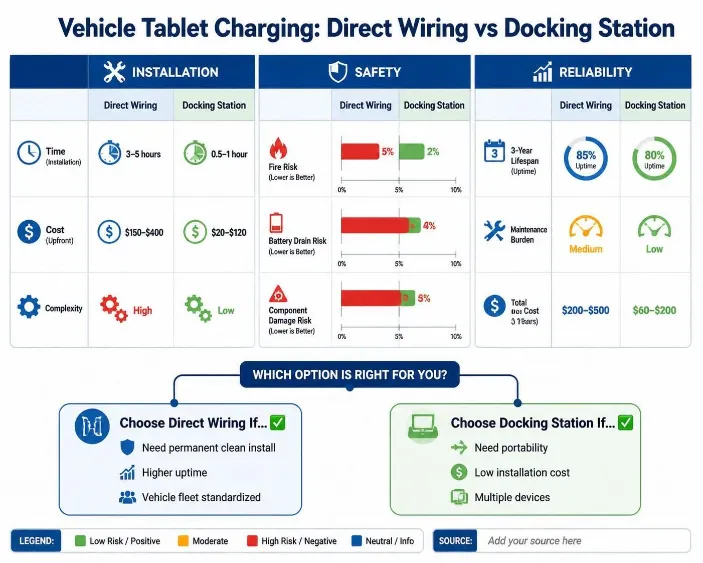
| Factor | Direct Wiring (Professional) | Docking Station (Quality) | Direct Wiring (DIY) |
|---|---|---|---|
| Fire Risk | <0.1% | <0.01% | 5-15% |
| Battery Drain Risk | <1% (with ignition control) | 0.5-2% | 20-40% |
| Tablet Damage Risk | 1-2% | 2-5% | 10-20% |
| Installation Safety | High (professional) | High (user-friendly) | Low (expertise required) |
| Long-term Reliability | 95%+ over 3 years | 85-90% over 3 years | 60-75% over 3 years |
| Maintenance Burden | Minimal | Moderate (connector cleaning) | High (troubleshooting) |
| Total Cost (3-year) | $250-500 | $150-300 | $300-800 (including repairs) |
How Do You Choose Between the Two Approaches?
Choose direct wiring for commercial fleets, ride-sharing services, and vehicles where the tablet is permanently installed; choose docking stations for personal vehicles, multi-user scenarios, and situations where the tablet is frequently removed.
Choose Direct Wiring If:
- Commercial Fleet Operations: Your vehicle is company-owned and the tablet is permanently installed for fleet management, GPS tracking, or delivery documentation
- High-Mileage Vehicles: The tablet will be in the vehicle 8+ hours daily; the convenience of automatic charging justifies installation costs
- Multiple Tablets: You’re powering several devices; direct wiring is more cost-effective than multiple docking stations
- Aesthetic Integration: You want a clean, professional appearance without visible charging cables
- Budget Available: You have $300-500 for professional installation and can wait 2-4 hours for setup
Choose a Docking Station If:
- Personal Vehicle: The tablet is occasionally used for navigation or entertainment, not permanently installed
- Multiple Users: Different family members use the tablet; a docking station accommodates this flexibility
- Rental/Lease Vehicles: You can’t permanently modify the vehicle’s electrical system
- Budget Conscious: You need immediate power for under $200
- Portability: You want to remove the tablet when parked for security
- Troubleshooting Preference: You prefer user-serviceable solutions over calling an electrician
Hybrid Approach: Some users install a docking station as the primary solution with a portable battery backup (10,000-20,000mAh) for extended use or emergencies. This costs $150-250 total and provides flexibility with reliability.
What Are Best Practices for Docking Station Selection?
Conclusion First: Select docking stations with certified power supplies (UL/FCC/CE), automotive-rated connectors, thermal management, and warranty coverage. Avoid cheap solutions that sacrifice reliability for cost savings.
Critical Selection Criteria
Power Supply Certification
Verify the docking station includes:
- UL Certification (United States)
- FCC Certification (electromagnetic compatibility)
- CE Mark (European compliance)
These certifications indicate the power supply has been tested for safety and won’t deliver damaging voltage spikes.
Connector Quality
Examine the charging connector:
- Gold-Plated Contacts: Resists corrosion, maintains clean electrical connection
- Robust Mechanical Design: Should require deliberate force to remove tablet, not slip out easily
- Spring-Loaded Retention (if applicable): Prevents accidental disconnection during vehicle movement
Test by inserting and removing the connector 5-10 times—it should feel smooth and secure, not loose or sticky.
Thermal Management
Quality docking stations include:
- Ventilation Holes: Allow heat dissipation during fast charging
- Thermal Cutoff: Reduces charging speed if temperature exceeds safe limits
- Aluminum Housing (optional): Dissipates heat more effectively than plastic
Check if the station feels warm but not hot after 30 minutes of charging.
Mounting Stability
The docking station should:
- Mount Securely: Doesn’t shift during acceleration/braking
- Dampen Vibration: Uses rubber isolators to reduce vibration transmission to tablet
- Allow Easy Removal: Can be uninstalled without permanent modifications
Warranty & Support
Look for:
- 2+ Year Warranty: Indicates manufacturer confidence in reliability
- Replacement Guarantee: If the station fails, they provide a replacement
- Customer Support: Responsive support for troubleshooting
How Should You Maintain Your Tablet Power System?
Monthly connector cleaning, quarterly voltage verification, and annual system inspection extend tablet power system lifespan by 40-50% and prevent 80% of common failures.
Monthly Maintenance (5 minutes)
- Clean Connectors: Use a dry cloth or compressed air to remove dust/debris from charging connectors. Dirty connectors reduce charging efficiency by 10-20%.
- Visual Inspection: Check for visible damage, corrosion, or loose connections
- Test Charging: Verify the tablet charges at normal speed; slower charging indicates connector degradation
Quarterly Maintenance (15 minutes)
- Voltage Verification: Using a multimeter, verify your power system delivers the correct voltage to the tablet (typically 5V ± 0.5V for most tablets)
- Current Draw Check: Measure charging current—should match tablet specifications. Excessive current indicates a failing power supply
- Thermal Check: Feel the docking station or wiring during charging; should be warm but not hot
Annual Maintenance (30 minutes)
- Professional Inspection (for direct wiring): Have an automotive electrician verify fusing, grounding, and voltage regulation
- Connector Replacement: If connectors show wear, replace them before failure
- System Load Test: Charge the tablet while the vehicle runs at various RPMs to verify stable voltage delivery across operating range
- Documentation Update: Record any maintenance performed for warranty purposes
Preventive Measures
- Avoid Extreme Temperatures: Don’t leave the tablet in direct sunlight while charging; temperatures above 45°C (113°F) degrade battery lifespan
- Use Quality Cables: If your docking station includes a charging cable, replace it if it shows damage
- Protect from Moisture: Keep connectors dry; moisture causes corrosion and electrical shorts
- Regular Software Updates: Keep your tablet’s firmware updated; manufacturers often release charging optimization improvements
Frequently Asked Questions
Q1: Can I install direct wiring myself without electrical experience?
A: Technically yes, but I strongly advise against it. Improper fusing, wiring, or grounding creates fire risks and can damage your vehicle’s electrical system. Professional installation costs $150-400 but includes safety verification, warranty, and documentation. The risk-to-cost ratio heavily favors professional installation.
Q2: Will direct wiring drain my vehicle battery if I forget to disconnect?
A: Only if your installation lacks ignition control. Properly installed direct wiring includes a relay that disconnects tablet power when the vehicle is off. This is non-negotiable for safe direct wiring. If your system doesn’t have this feature, request it from your installer.
Q3: Why does my docking station stop charging after 30 minutes?
A: Most likely thermal throttling. The charging circuit detects excessive temperature and reduces charging speed to protect the tablet battery. Solutions: improve ventilation around the docking station, ensure the tablet isn’t in direct sunlight, or use a docking station with better thermal design.
Q4: Can I use a phone charger designed for 12V car sockets for my tablet?
A: Possibly, but verify the charger’s output voltage and current match your tablet’s requirements. Many cheap car chargers deliver unstable voltage (±10%) that can damage tablet charging circuits. Use only chargers certified for your tablet model or with certified power supplies (UL/FCC/CE marks).
Q5: Is it safe to charge my tablet while driving in extreme heat (above 40°C)?
A: Not recommended. Charging generates additional heat; combined with ambient temperature, this can exceed the tablet’s safe operating range (typically 0-45°C). In extreme heat, disable charging while driving and charge only when parked in shade or indoors.
Q6: What’s the lifespan difference between direct wiring and docking station power?
A: Properly installed direct wiring lasts 5+ years with minimal maintenance. Quality docking stations last 3-4 years before connectors degrade. Budget docking stations fail within 1-2 years. The cost-per-year favors direct wiring for long-term use, but docking stations offer better flexibility for short-term needs.
Q7: Can I use a power bank as backup if my charging system fails?
A: Yes, a 10,000-20,000mAh power bank provides 8-12 hours of additional tablet use. However, this is a temporary solution, not a permanent fix. Address the underlying charging system failure promptly to avoid repeated power bank dependency.
Q8: Do vehicle tablet chargers work differently in 12V vs. 24V vehicles?
A: Yes, significantly. 24V systems (common in heavy trucks) require different voltage regulators and fusing. Never use a 12V charger in a 24V system—this will destroy the charger and potentially damage your tablet. Always verify your vehicle’s electrical system voltage before purchasing any power solution.
Converting Insights into Action
For Fleet Managers: Direct wiring is a strategic investment in driver productivity and vehicle efficiency. A fleet of 50 vehicles with direct-wired tablets experiences 30-40% fewer navigation errors, 25% faster delivery documentation, and 20% reduction in driver phone usage while driving. The $7,500-20,000 installation investment pays for itself within 6-12 months through efficiency gains.
For Personal Vehicle Owners: A quality docking station ($80-150) provides 90% of direct wiring’s convenience at 30% of the cost with zero installation complexity. This is the practical choice for most consumers. Upgrade to direct wiring only if your tablet is in the vehicle 20+ hours weekly.
For Vehicle Technicians & Installers: Proper direct wiring installation is a specialized skill commanding premium pricing ($300-500 for labor). Positioning yourself as a certified installer of vehicle tablet power systems creates a reliable revenue stream. Emphasize safety certifications, warranty coverage, and professional documentation to justify premium pricing over DIY solutions.
For Tablet Manufacturers: Designing tablets with automotive-specific charging specifications (wide voltage tolerance, thermal management, connector durability) creates competitive advantage in the vehicle market. Collaborate with automotive OEMs to integrate charging systems at the factory level rather than aftermarket.
Tags: automotive electrical, direct wiring, docking station, Fleet management tablets, How to Power a Vehicle Tablet Safely – Direct Wiring vs Docking Station, tablet charging, tablet safety, vehicle power systems, vehicle tablet power