IP65 Vehicle Display with J1939 for Trucks: Built for the Cab. Verified for the Network.
The right IP65 vehicle display with J1939 for trucks is not simply a waterproof screen with a CAN connector. It is a complete installation: a protected enclosure, a verified vehicle-data interface, power management that survives daily operating cycles, and software that presents trustworthy information. Choose it by proving the exact truck, harness, firmware, and application work together—not by comparing headline specifications alone.
THE PROCUREMENT SHORTCUT
Buy evidence.
Not interface labels.
Ask for the enclosure test scope, supported J1939 data, vehicle-power test conditions, and a pilot on representative trucks before approving fleet deployment.
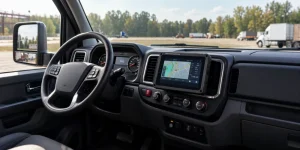
Also show what keeps it working. Suggested photograph: actual truck-cab installation with the mount, cable retention, and connector routing visible.
Image brief: use an approved installation photograph rather than a generic tablet render. Keep the road view unobstructed and avoid displaying identifiable driver or customer data.
01 / What are you actually buying?
A J1939 truck display can mean three different products. A dedicated HMI presents vehicle information through embedded software. A rugged Android vehicle tablet runs applications locally. A display connected to a separate telematics gateway relies on another device to acquire and decode vehicle data. These architectures can look similar in a dashboard photograph but create different integration responsibilities.
For a first-time buyer, the practical question is simple: who turns the truck’s network traffic into the values shown on screen? The answer determines which hardware, drivers, decoding software, and support agreements belong in the quotation.
Dedicated J1939 HMI
Evaluate signal coverage, configuration tools, startup behavior, and the supplier’s ability to maintain the embedded application.
Rugged vehicle tablet
Evaluate the CAN interface, Android or Linux access, application integration, device management, and operating-system support.
Display + gateway
Evaluate both devices and the connection between them, including authentication, reconnection, buffering, and responsibility for fault diagnosis.
02 / IP65 protects the enclosure—not the whole project
Under the IEC ingress-protection framework, IP65 means dust-tight protection and protection against water jets. It does not establish suitability for immersion or high-pressure hot-water cleaning. IEC 60529 is the relevant enclosure-protection standard; it should not be treated as a combined vibration, electrical, and vehicle-network qualification. Source: IEC IP ratings guide.
[webstore.iec](https://webstore.iec.ch/en/publication/2452)Read the rating as an installation condition
- Does the rating cover the entire enclosure or only the front panel?
- Must unused ports remain capped?
- Are the specified connectors and cable seals included?
- Does the dock have its own environmental protection?
- Does the test report identify the same configuration being purchased?
SPECIFICATION TRAP
An IP65 tablet connected through an unprotected adapter should not be accepted as an IP65 installation without evidence covering that assembled configuration.
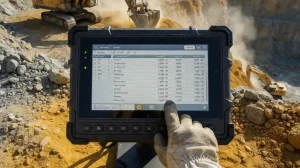
For a truck-cab application, request separate evidence for temperature, vibration, shock, power disturbances, and electromagnetic compatibility. A rugged enclosure is one part of the acceptance file, not a substitute for it.
03 / CAN hardware is not the same as J1939 integration
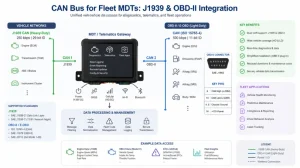
A CAN interface provides access to a vehicle network; the J1939 implementation determines how the application interprets and uses its messages. SAE publishes separate documents for elements of the J1939 system, including the off-board diagnostic connector and the 500 kbit/s physical layer. SAE’s connector documentation explicitly addresses 250 Kbps and 500 Kbps vehicle networks, which is why “CAN supported” is not a sufficient compatibility statement. Source: SAE J1939/13; SAE J1939/14.
REFERENCE ARCHITECTURE / NOT A WIRING DIAGRAM
Available network signals
Harness + CAN hardware
Decode + validate + timestamp
Display + alerts + records
A direct-CAN tablet and an external-gateway installation distribute these functions differently. Confirm the ownership and support boundary for every stage.
Turn the signal list into a contract deliverable
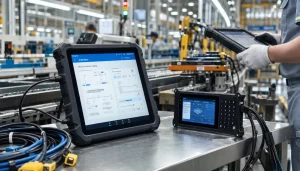
For each required value—such as engine speed, coolant temperature, vehicle speed, or engine hours—ask the integrator to document the source message, PGN/SPN mapping where applicable, units, update behavior, unavailable-value handling, and the trucks on which it was verified. PGNs identify message groups; SPNs identify parameters within the J1939 data model. Do not assume every truck exposes every desired value through the chosen connection.
Treat fault-code presentation as a separate feature. Request a demonstration of supported diagnostic messages, readable descriptions, timestamps, and behavior when a fault becomes inactive. For vehicle data and diagnostic integration, Waysion’s own integration guide also distinguishes CAN connectivity from the decoding work required to produce usable information.
[waysion](https://www.waysion.com/blog/j1939-can-obd-rugged-tablet-integration-guide/)04 / The specification sheet should become an acceptance matrix
The following is a recommended purchasing framework, not a claim that every truck display requires the same numeric limits. Set thresholds around the actual cab, route, electrical architecture, and software workload.
| Requirement | Evidence to request | Pilot acceptance check |
|---|---|---|
| IP65 protection | Test report and connector/cap conditions | Inspect the delivered installation against the tested configuration. |
| J1939 data access | Bit rates, pinout, SDK/API documentation, signal list | Compare displayed values with an approved reference on representative trucks. |
| Vehicle power | Input range, protection design, ignition logic, sleep-current data | Exercise starting, key-off, sleep, wake, and controlled shutdown. |
| Sunlight-readable truck display | Brightness specification, dimming range, viewing-angle information | Test the actual application in direct sun, reflections, and night conditions. |
| Mechanical installation | Mount drawings, retention method, cable strain-relief plan | Check visibility, reach, connector movement, and servicing access. |
| Software lifecycle | Update policy, remote-management support, recovery process | Deploy, update, recover, and replace a device without losing required settings. |
05 / A better cockpit starts with fewer distractions
For a vehicle-mounted tablet for fleet management, screen size is only the starting point. Validate the driver’s real tasks: reading a dispatch update, identifying a warning, confirming a stop, or checking a camera view when appropriate.
Specify a restrained driving interface, readable labels, clear data-age indicators, and night dimming. Evaluate mounting position against sightlines, airbag zones, controls, and local installation requirements. A larger display is not automatically a better installation if it creates glare or forces an awkward reach.
Daylight and night. Use real photographs from the same mounting position; do not simulate readability with edited screen brightness.
06 / Two Waysion platforms to put on the shortlist
Use these product families as starting points for an integration discussion. Published platform specifications do not replace a configuration-specific quotation, interface document, or vehicle compatibility test.
Waysion Q777
A 7-inch IP65 Android 14 vehicle tablet positioned for fleet, logistics, and field workflows. Waysion’s published materials describe docking-oriented deployment and vehicle interfaces.
Evaluation priority: confirm the exact CAN/J1939 hardware path, supplied harness, SDK, vehicle-power configuration, and supported signals for the ordered unit.
Explore the Q777 vehicle tablet →Waysion Mars 876
An 8-inch IP65 Android 15 platform with RK3576 processing. Waysion lists CAN Bus, industrial interfaces, support for four AHD cameras, and 9–36V input with a docking station in its product-family specifications.
Evaluation priority: confirm the J1939 implementation, camera/application interoperability, thermal behavior, and the power configuration supplied with your dock.
Explore the Mars 876 platform →Important distinction: J1939 capability does not establish ELD compliance
A rugged Android tablet may form part of an electronic logging system, but hardware connectivity alone does not make that system compliant. FMCSA states that ELD providers self-certify and register their devices. If the truck display will support regulated logging, verify the exact ELD solution on the current registered list rather than accepting a generic “FMCSA-certified tablet” claim. Source: FMCSA registration and certification guidance; current registered ELD list.
07 / Prove the installation before scaling it
A useful pilot tests failure behavior as carefully as normal operation. Include representative truck models, electrical systems, routes, and cab conditions—not just the easiest vehicle in the workshop.
- Establish the baseline. Record vehicle identity, interface location, harness revision, device configuration, firmware, application version, and required signals.
- Verify data fidelity. Compare required values against an approved reference. Disconnect the data source and check that the application marks information as unavailable or stale instead of presenting it as current.
- Exercise power transitions. Test starting, repeated ignition cycles, parked operation, shutdown, and recovery. Measure sleep current against the project’s battery budget.
- Challenge the installation. Check vibration-related connector movement, temperature behavior, glare, cable retention, and service access under representative conditions.
- Test fleet operations. Demonstrate remote configuration, interrupted connectivity, application recovery, device replacement, and restoration of vehicle-specific settings.
Define pass/fail criteria before the pilot begins. Useful measures include time to usable vehicle data, missing-data events, unexpected restarts, recovery time, and technician effort per installation. Record actual results instead of substituting a single “pilot successful” statement.
Questions buyers ask before issuing a purchase order
Can an IP65 truck display be pressure-washed?
Do not infer that from IP65 alone. IEC distinguishes protection against water jets from higher-pressure hot-water protection. Ask for the device’s permitted cleaning method and the rating of the installed connector configuration.
Will a J1939 display work with every heavy-duty truck?
Do not approve universal compatibility without testing. Require a supported-vehicle matrix covering the network bit rate, connection point, harness, required data, and software version. SAE’s documentation recognizes different network speeds; the integration still needs to be verified for the vehicle and task.
Is a 9–36V input enough to prove truck-power reliability?
No. Treat the input range as one specification, then request separate evidence for the intended vehicle’s electrical disturbances, protection functions, ignition behavior, and shutdown strategy. Validate those behaviors in the pilot rather than assuming that the voltage label covers them.
What should an RFQ for a rugged J1939 vehicle display include?
Include the truck models, intended mounting location, required signals, preferred operating system, power architecture, environmental conditions, camera and peripheral needs, connectivity requirements, support period, and acceptance tests. Ask the supplier to separate standard features, options, engineering work, and customer responsibilities.
ENGINEERING HANDOFF
Make the next conversation configuration-specific.
Send your vehicle matrix, signal list, mounting constraints, and power requirements with the inquiry. Ask for a proposed bill of materials and a pilot acceptance plan. The most valuable deliverable is traceability: a clear connection between each operational requirement, the supplied hardware and software, and the test that proves it works.