- Core Capabilities of Industrial Vehicle Tablets
- Why Tablets Drive Fleet Efficiency
- Choosing the Right Industrial Tablet for Your Fleet
- Deployment Best Practices for Industrial Vehicle Tablets
- Table: Tablet Types and Fleet Impact
- How to Measure ROI and Total Cost of Ownership
- Case Study Highlights (Industry-Agnostic Patterns)
- Frequently Asked Questions (High-Volume Search Topics)
- Implementation Checklist
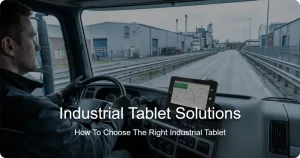
Industrial vehicle tablets are purpose-built devices designed to withstand harsh industrial environments while delivering reliable performance for fleet operations. They combine rugged durability, real-time telematics, robust connectivity, and purpose-built software to streamline tasks such as route optimization, asset tracking, driver coaching, and maintenance scheduling. This article provides a professional, search-oriented overview that helps fleet managers select, deploy, and maximize the value of industrial vehicle tablets.
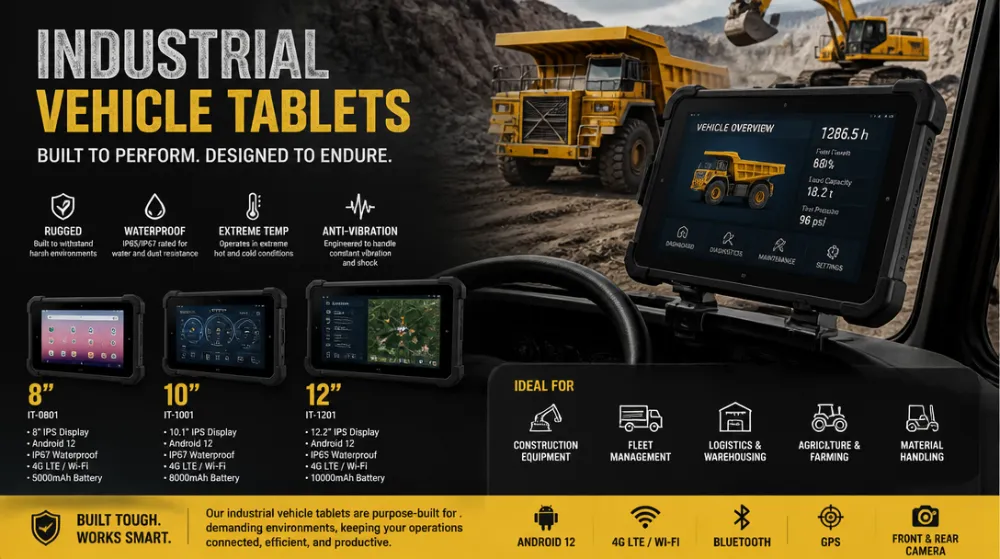
Core Capabilities of Industrial Vehicle Tablets
Industrial vehicle tablets are more than just small screens. They integrate hardware and software tuned for mobility, warehouse floors, construction sites, and distribution yards. The following capabilities are fundamental for fleet success:
Durability and reliability: Most devices meet or exceed MIL-STD-810G testing and IP ratings (e.g., IP67) to resist drops, dust, water, and vibration. Extended operating temperature ranges ensure stable performance in hot dispatch bays or freezing outdoor yards.
Glove-friendly input and daylight readability: Large, high-brightness displays with capacitive touch and glove-friendly interfaces minimize interaction friction in busy environments. Anti-glare screens improve legibility under sunlight or vehicle cab windows.
Power efficiency and battery life: Optimized power management, hot-swappable batteries, and long-life cells support entire shifts without frequent recharging. Charging options include vehicle-mounted docks and rapid USB-C charging.
Connectivity and telematics: Integrated 4G/5G, Wi-Fi, Bluetooth, GNSS (GPS/GLONASS), and often sub-GHz radios enable real-time location, asset tracking, and remote diagnostics. Edge processing supports offline maps and local data caching for intermittent connectivity.
Scanning and accessibility: Built-in cameras, barcode/RFID scanning, and stylus support enable inventory control, proof of delivery, and maintenance logging even in low-light conditions.
Security and management: Enterprise-grade security, remote device management, and app whitelisting protect fleet data. Secure boot, encryption, and VPN support mitigate risk when tablets connect to corporate systems in the field.
Software ecosystem: Compatibility with fleet management software, WMS/WCS, route optimization, ELD/compliance apps, and driver coaching platforms ensures a cohesive operation rather than a collection of isolated tools.
Why Tablets Drive Fleet Efficiency
Industrial vehicle tablets unlock efficiency by delivering timely information to the right people, at the right moment, in the right place. The following mechanisms illustrate measurable impacts on fleet performance:
Real-time visibility: Live location of vehicles and pallets reduces idle time and search time. Dispatchers respond faster to exceptions, reroute drivers, and minimize bottlenecks in yards.
Improved accuracy: Scanning capabilities reduce manual data entry errors in receiving, put-away, and loading. Fewer errors translate to faster cross-docking and improved inventory accuracy.
Enhanced driver productivity: On-device work instructions, digital checklists, and offload of paperwork to mobile apps save minutes per shift and reduce fatigue through streamlined workflows.
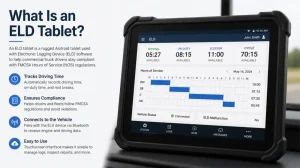
Maintenance and safety: Proactive maintenance alerts, diagnostic data, and fault codes enable preventative care. In-cab alerts support safety protocols and help drivers avoid hazards in dynamic environments.
Analytics and ROI: Centralized data feeds enable fleet-level analytics, enabling continuous improvement cycles and demonstrating a clear ROI through reduced fuel consumption, downtime, and overtime costs.
Choosing the Right Industrial Tablet for Your Fleet
Selecting the right device requires aligning hardware specs with operational needs. Consider the following decision criteria to avoid overpaying for features you won’t use and under-serving critical tasks.
Environment and durability: Match IP rating and MIL-STD requirements to the typical operating conditions (indoor warehouse vs. outdoor yard, vibration from heavy machinery, exposure to dust or chemicals).
Display and input: Choose screen size, brightness (nits), and readability for the lighting conditions inside cabs and on loading docks. Determine whether glove-friendly touch or a stylus is necessary for precise data capture.
Operating system and app compatibility: Android and Windows each have strengths. Android often offers broader app ecosystems and faster updates; Windows provides native desktop-like software compatibility for certain enterprise apps.
Connectivity and cellular coverage: For dispersed fleets, robust cellular bands (5G/4G), eSIM support, and VPN capabilities are essential. Plan for roaming or multi-operator SIMs if your fleet operates across regions.
Security and device management: Look for enterprise mobility management (EMM) support, remote wipe, encryption, secure boot, and containerization to separate work data from personal data and reduce risk.
Accessories and deployment: Vehicle mounts, docking stations, cradles, barcode/scan sleds, and rugged keyboard attachments affect total cost and deployment speed. Ensure compatibility with existing fleet hardware and charging infrastructure.
Deployment Best Practices for Industrial Vehicle Tablets
Implementing tablets effectively requires planning that covers procurement, integration, user adoption, and ongoing optimization. The following guidelines help ensure success across fleets of different sizes and sectors.
Stakeholder alignment: Involve fleet managers, operations supervisors, IT, safety, and drivers early to map use cases, success metrics, and training requirements. Establish governance for software updates and data policies.
Roadmap and pilot programs: Start with a focused pilot in a single shift or location. Measure key indicators such as cycle time, error rate, and downtime before wider rollout. Use pilot results to calibrate device choice and app configurations.
App architecture and data flow: Centralize essential apps on the tablet with offline capabilities for areas with poor connectivity. Define data sync policies to balance latency, data integrity, and bandwidth usage.
Training and change management: Provide hands-on training emphasizing real-world tasks. Create quick-reference guides and in-cab prompts to reinforce best practices. Solicit driver feedback to improve usability.
Security posture: Enforce strong authentication, device encryption, app whitelisting, and regular software updates. Establish incident response procedures for lost devices or data breaches.
Ongoing support and optimization: Schedule regular device health checks, monitor battery performance, and refresh devices on a predictable cadence. Leverage telemetry data to optimize routing, maintenance intervals, and inventory flows.
Table: Tablet Types and Fleet Impact
| Tablet Type | Durability & Ports | OS | Ideal Use Case | Key Fleet Benefits |
|---|---|---|---|---|
| Rugged Android Tablet | IP65/IP68, MIL-STD-810G; USB-C, docking, barcode sleds | Android 11/12/14/15 | Warehouse floors, yard trucks, loading docks | Real-time scanning, offline maps, low TCO, fast app adoption |
| Rugged Windows Tablet | IP65/IP67, rugged mount options | Windows 10/11 IoT | Maintenance-heavy fleets, field service, inspections | Full desktop app compatibility, robust data processing |
| Industrial-grade 2-in-1 Tablet | Moderate MIL-STD, high-visibility display | Windows/Android hybrid | Sales-to-field integration, mixed task teams | Flexibility for multiple roles, streamlined onboarding |
Note: The choice between Android and Windows often depends on the software ecosystem you plan to deploy. Android tends to offer broader app catalogs and quicker updates, while Windows provides seamless integration with existing Windows-based enterprise software and legacy tools.
How to Measure ROI and Total Cost of Ownership
To justify capital expenditure and ongoing operating costs, define a clear framework for ROI. Consider these elements in your business case:
Capital expenditure: Device costs, mounts, docks, scanning hardware, and initial software licenses. Consider bulk purchasing discounts and vendor integration fees.
Operational savings: Reductions in driving time, cycle time, fuel consumption, and overtime. Improvements in inventory accuracy leading to lower write-offs and better stock availability.
Maintenance and uptime: Fewer breakdowns due to proactive diagnostics and easier field servicing. Reduced manual paperwork lowers error-related rework."
Training and adoption: Time-to-value for drivers and maintenance teams; cross-training reduces skill silos and accelerates rollout.
Data-driven optimization: Quantifiable improvements from route optimization, asset utilization, and maintenance scheduling. Define KPIs such as on-time departures, average dwell time, and first-pass yield.
Case Study Highlights (Industry-Agnostic Patterns)
Across multiple sectors, deploying industrial vehicle tablets has consistently yielded measurable gains. Consider the patterns below when planning your own rollout:
Warehousing and distribution: Tablets enable real-time dock-to-dock visibility, faster put-away, and accurate order picking. Inventory accuracy improves, and throughput goes up as bottlenecks are identified and resolved quickly.
Construction and mining fleets: Rugged tablets support equipment inspections, maintenance scheduling, and safety checks in harsh environments. Operators receive job instructions directly in-cab, reducing miscommunication and downtime.
Retail and field service logistics: 2-in-1 rugged devices enable sales, service, and delivery teams to capture proofs of delivery, update stock levels, and access customer data on-site, accelerating service cycles.
Frequently Asked Questions (High-Volume Search Topics)
Q1: What is an industrial vehicle tablet and why do fleets need one?
A1: An industrial vehicle tablet is a rugged, purpose-built device designed for mobile fleet operations. It consolidates route planning, asset tracking, inventory control, maintenance scheduling, and driver communication into a single platform. The result is improved accuracy, faster decision-making, and higher uptime across warehouse, yard, and field operations.
Q2: How do rugged tablets improve safety and uptime in fleets?
A2: Rugged tablets deliver in-cab and in-vehicle alerts, digital checklists, and maintenance reminders. Real-time diagnostics help prevent unexpected breakdowns, while displaying hazard alerts and safety procedures reduces risk for drivers and operators in dynamic environments.
Q3: How should I choose between Android and Windows tablets for my fleet?
A3: Android tablets generally offer broader app ecosystems, faster updates, and simpler app deployment, making them ideal for scanning, routing, and simple workflow apps. Windows tablets provide native compatibility with desktop software, Excel-based tools, and specialized enterprise apps. Your choice should align with existing software, IT skills, and the required ecosystem of apps.
Q4: What security considerations are essential for fleet tablets?
A4: Implement device enrollment (EMM/MDM), enforce strong authentication, enable encryption at rest and in transit, restrict app installations to a known whitelist, and ensure secure boot and regular software updates. Data policies should govern what information is stored on devices and how it syncs with the central system.
Q5: What is a realistic timeline for rolling out industrial vehicle tablets across a mid-sized fleet?
A5: A phased approach typically spans 6–12 weeks for a pilot in one region, followed by a full-scale rollout over 3–6 months. The timeline depends on the complexity of integrations with WMS, TMS, or ERP systems, the number of devices, and the availability of training resources.
Implementation Checklist
Use this concise checklist to guide your deployment from pilot to enterprise-wide adoption:
Define use cases and success metrics
Choose the right tablet type for each role
Confirm software integrations and data flows
Establish hardware supply, mounts, and charging infrastructure
Plan training, change management, and support
Set up security policies and device management
Run a pilot and measure outcomes before scaling
Tags: Android vs Windows rugged tablets for fleets, fleet efficiency tablets deployment guide, industrial vehicle tablets for warehouses, maintenance and telematics tablets for heavy equipment, Rugged tablets for fleet management